
on

On March 1 , 2016 Jide Finally released the beta version of Remix Os . The beta version comes with many new features which include ( 32-bit support , Dual Boot support , UEFI support ) and over 50 bug fixes .
Remix Os is a Android Based Operating system , But it did not comes with Google Play services .. Well Actually It comes with Google Play Services , but they are Disabled and Hidden .
We don't know why Jide have disabled Google Play services on latest Remix Os Beta . But thanks to a redditor ( SubredditReddit ) for finding a way to Enable all the Google play services .
How to enable hidden Google Apps in Remix Os Beta
Requirements -
Step 1. Boot to Remix Os Beta
Step 2. Now On The Remix Os Home screen , Enter Root terminal by Just Pressing ( Alt + F1 ) Keys .
 |
Step 3. Now In The terminal Type and run this -
pm disable com.jide.apppolicy
Step 4. Now to Display all the Disabled apps , Run this command -
pm list packages -d
Step 5. Now you will get a list of all the Apps disabled , to enable them type -
pm enable <package name>
Example - To enable play store type
pm enable com.android.vending
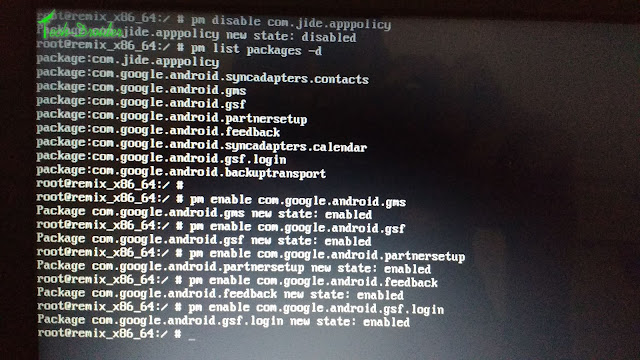
And enable all the Google apps by using the 5th Step .
Step 6. Now Press [ Alt + F7 ] to Enter Remix Os Home screen .
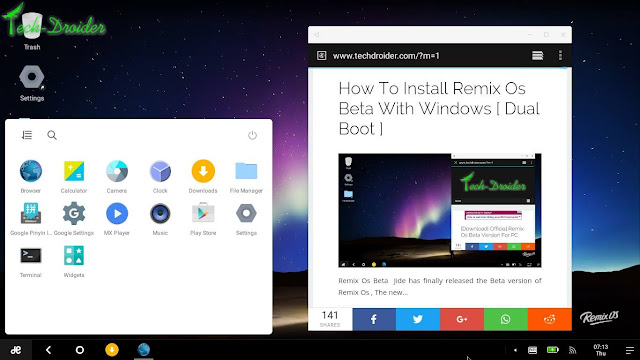
via - reddit
![How to Install Remix Os Beta With Windows [ Dual Boot ]](https://blogger.googleusercontent.com/img/b/R29vZ2xl/AVvXsEgYHMOQfbMoGJg4I7D7hFzZUIqlrRlMyJgBB9fOb8l33wJU78p6w6yrjzKHnZg4t-lApjv7VPImLGbr5ydYCCY_z5d4m-bKlAwLssCrsE8a-JUbUjdyFKPesCndjy0yQPuUwgjyvKIibj11/s640/11252445_951915238227616_2497940799367415493_o.jpg "How to Install Remix Os Beta With Windows [ Dual Boot ]")
![How to Install Remix Os Beta With Windows [ Dual Boot ]](https://blogger.googleusercontent.com/img/b/R29vZ2xl/AVvXsEgK1zo8hayX1fy_srBzNop4NodkMa87t254RNViFx1mr5CamDWSt4OXHN4zNMucFwLb4Nd6ZT8UAVHzQOQnD6RlzBcDV_zDDpdgJGghN8rCgilFia-AWcJgHGAnuFVbZF2MkPESe1_C602K/s1600/1.png "How to Install Remix Os Beta With Windows [ Dual Boot ]")
![How to Install Remix Os Beta With Windows [ Dual Boot ]](https://blogger.googleusercontent.com/img/b/R29vZ2xl/AVvXsEgQl60PhjENDLECj9nHLe54NmTn_CmR79aNZ-BXS_BXxbI2diVTbbzP0HLTBjYcyVewFkZfKHPV9J7_n4QzKBupYcUCfqfGFrZqGz-5cf1gOf0CUwbfw_rkSJZLvuQgWVbUPqC5nP_8qpmz/s1600/2.png "How to Install Remix Os Beta With Windows [ Dual Boot ]")
![How to Install Remix Os Beta With Windows [ Dual Boot ]](https://blogger.googleusercontent.com/img/b/R29vZ2xl/AVvXsEizsDAhmR37y0QY6I1hfvWP7mVUJ5vkABoHU5Z0fR5VaIAYI5mjyxhza3a0SiJeOE0rSS9Kv8DprC7XLT7WGyCkwwKS9irJtJ-EIdBukhD12krdUYNGR5EUBDmqYkZVRkmIZwDWOxz4OBoQ/s1600/3.png "How to Install Remix Os Beta With Windows [ Dual Boot ]")
![How to Install Remix Os Beta With Windows [ Dual Boot ]](https://blogger.googleusercontent.com/img/b/R29vZ2xl/AVvXsEiZ_y6Mp8k8Yoi_0oHPi3GS7J8_OLWwxbxHdJYjntwoGAS4SAPETOg1hbRyL8QsVX9sJqKe_qotTj1XrF9RdS5-dm9zKQXN6s3_ijTXZiawrleK44YZlxqnb2EH3Md5ovOGhsg-6aaLs5ou/s1600/4.png "How to Install Remix Os Beta With Windows [ Dual Boot ]")
![How to Install Remix Os Beta With Windows [ Dual Boot ]](https://blogger.googleusercontent.com/img/b/R29vZ2xl/AVvXsEiUz0xmkx5wSwRf-lFTUU0CGasoo-DDgE0eY_bOwb7M5JKsv615QMJ2KAyttA-hqAnssppDoK6jRuVKQoPcPLiK53vw9ABX450nE-vo330o2uG4baa1tuJd_ZXbhZLND8BlrAIa76PLMohn/s1600/5.png "How to Install Remix Os Beta With Windows [ Dual Boot ]")
![How to Install Remix Os Beta With Windows [ Dual Boot ]](https://blogger.googleusercontent.com/img/b/R29vZ2xl/AVvXsEjA-boOkibPfxobUFyb3PN7hAikJg1lv2LvqZsfZX800u9PkHWnzXfiLAM8jtjk0CzjJ-SJlV1q2ZtYKVOkxxWdsdC97VgQ808pY5rAxOQOSaMnCRpuVqYErS3btMP8sCxdiijeneuNczn-/s1600/6.png "How to Install Remix Os Beta With Windows [ Dual Boot ]")
![How to Install Remix Os Beta With Windows [ Dual Boot ]](https://blogger.googleusercontent.com/img/b/R29vZ2xl/AVvXsEirWKRLN_FymtTkOuMCBzGFqdMG0nDtHQCx4C7u398fj7grRMHGSex6LY7zMeX-Mj9tGeJkQchQdwnJABBhHqsmu4prezzGwipQEDB0IrRo_6bnaLXC7cAmV5v7tpyDI9UZrrwAsN_8STx0/s640/DUAL-boot.jpg "How to Install Remix Os Beta With Windows [ Dual Boot ]")


