TechDroider

How to enable LED in Moto G4 Plus


Just Like Moto G 3rd Generation , Moto G4 Plus also comes with a hidden LED light . Although We already have Moto Display , which is an alternate to Led light . 


So if you still want to enable LED light in Moto G4 Plus , You can follow this Guide on How to enable LED in Moto G4 Plus -


Prerequisite - 


1. Moto G4 Plus : Unlocked , TWRP recovery Installed and Rooted .


Steps : How to enable LED in Moto G4 Plus -


Step 1. Go to Play store and Download Moto LED Application .

Step 2. Install the Application and Grant access with superuser . 

Step 3. Configure the application as per requirements .

Step 4. The LED will lit up only while charging . 


OnePlus 3 leaked on Amazon before announcement


OnePlus is going to announce The OnePlus 3 in upcoming hours , but seems that Amazon has already leaked the OnePlus 3 fully . 

Though the Amazon has now removed the listing but we have already captured many OnePlus 3 listing shots for you .

Also Read - OnePlus 3 Real life images leaked online 


Motorola VERVElife coming June 14th


The new Motorola fitness accessories are almost here! As we pointed out some time ago, Motorola Mobility sold its accessories division to Binatone Global last year, so the new devices will continue to carry the Motorola brand and be developed by the original Motorola audio team.

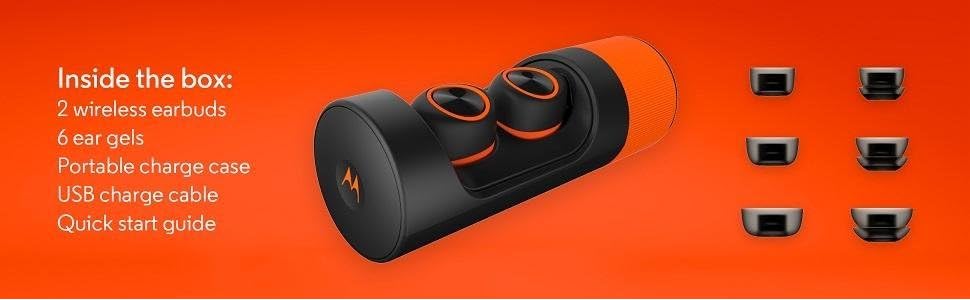
Motorola VerveOnes+ Completely Wireless and Waterproof Smart EarbudsVerveLife is a new range of fitness-oriented devices. They will sync with a dedicated app that will tell you the battery left the device has and will allow you to change music EQ settings. The new wearable devices are very interesting, coming in different models and prices.


Starting tomorrow, you will be able to buy the new Motorola accessories on Amazon in the USA, UK, Mexico and some European countries. The higher end VerveOnes and Ones+ come with a similar design to the Moto Hint+ and a similar charging method. The Ones+ will be water resistant and its price will be $249.

Other devices include the VerveLoop+ ($79), VerveRider and Rider+ ($69 and $79 respectively). Overall, it's a nice new range and we hope Binatone keeps making other Motorola accessories (hopefully a smart fitness band!). Here's the AMAZON link so you can check it out.


Here are some promo pics: 

Motorola VerveOnes+ Completely Wireless and Waterproof Smart Earbuds
Motorola VerveLoop+ Super Light, Waterproof, Wireless Stereo Earbuds Motorola VerveOnes+ Completely Wireless and Waterproof Smart Earbuds

Lenovo K5 launches in India at a very low price!


Lenovo has launched its K5 phone, introduced earlier this year. The phone will be available in India exclusively through Amazon, which is also the partner for other Lenovo products. In case you forgot about the phone, it's got a metal design and a 5" 720p screen, also offering Dolby sound and a 13/5MP camera set up. All of that is powered by a Snapdragon 415 SoC.


Although not yet available, the Lenovo phone will be available on June 22nd and you can register now. It's price will be very competitive. Remember it comes with an HD screen and Dolby sound, yet Lenovo revealed its price of INR 6,999. It's actually an insane price, and a very good deal. Hopefully they can do the same magic for the next Motorola Moto E...

Other specs for the phone include a 7.9mm body, a 2750mAH battery, 2GB of RAM and runs Android 5.1 lollipop, so hopefully Lenovo can update it to Android 6.0.1 soon.


More and more manufacturers are choosing the Amazon route, so it will be interesting to see what can Flipkart and others do to attract costumers and manufacturers.

How to Install TWRP on Moto G4 Plus


Users of Moto G4 Plus can now Install TWRP ( Team Win Recovery Project 3.x ) on their Smartphones . Thanks to yeshwanthvshenoy ( xda ) for porting TWRP for Moto G4 Plus .


Through TWRP , Moto G4 Plus users will be able to root , install custom roms , kernels etc . 

Screenshots - 


Pre-requisite -


  • Fastboot : Download from Here
  • Download TWRP for Moto G4 Plus - Here


Guide : How to Install TWRP on Moto G4 Plus -


Step 1. Boot your Moto G4 Plus to fastboot mode .

Step 2. Connect your Moto G4 Plus to PC  via USB Cable .

Step 3. Open cmd in the same window of fastboot .

Step 4. There type ( to temporarily boot this recovery )

fastboot boot twrp.img

or There type ( to permanently flash it )


fastboot flash recovery twrp.img


That's it , Feel free to comment below for any query -


OnePlus 3 Real life images leaked online

OnePlus is all set to reveal the OnePlus 3 on June 14 , but seems someone from outside is already using the device . 


@the_malignant ( twitter ) has shared some real life images of Graphite Gray colored OnePlus 3 .


OnePlus 3 Real life images leaked online

The devices looks amazing in the above image . However according to leaked information , OnePlus 3 will feature a 5.5 inch display which will be powered by 2.15 GHz Quad core Qualcomm Snapdragon 820 processor with 4GB/6GB of RAM and 64GB ROM . 

via