TechDroider

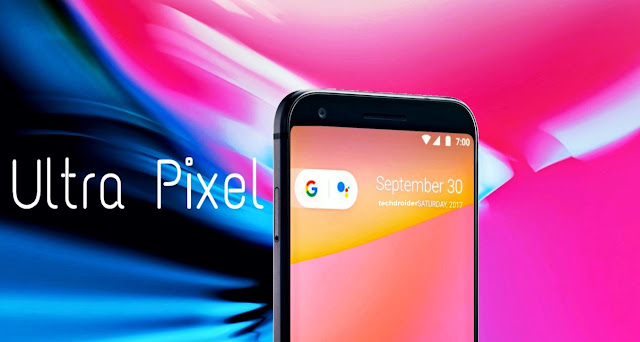
Ultra Pixel: Phone by Google (Concept)

Hey Guys, So we just created a Google Ultra Pixel Render Video to show how the actual design of the device may look like. The design of the Smartphone is based on the layout of the leaked “slide” shown in MrWhoseTheBoss Video.


Featured Image

Ultra Pixel: Phone by Google (Concept)


How to Root Xiaomi Mi A1

How to Root Xiaomi Mi A1
You can now Root the recently announced Xiaomi Mi A1. Rooting your smartphone give you admin rights and lets you do most of the things you want with your device considering get access to anything and everything that way.

After rooting, you'll be able to use certain apps which gives you more control over your device. Most popular applications include Titanium Backup, Greenify, WiFi Kill, Xposed, and Root Explorer.


In most of the cases, you need to Install TWRP (Custom Recovery) in order to root your Smartphone. But, Xiaomi Mi A1 can be rooted without Installing the TWRP Recovery. This root method is called CF-Auto-Root.


The below Guide will help you Rooting your Xiaomi Mi A1. Note that, You'll first need to Unlock Bootloader by following the Official Guide from Xiaomi.

Note: We are not responsible for any bricked devices.

How to Root Xiaomi Mi A1-

Step 1. Download Root Zip file from below .

Step 2. Go into fastboot mode (power off and hold power+vol down and release)

Step 3. Connect the phone to your PC

Step 4. Extract the above Zip File (Step 1.)

Step 5. Run Root.bat

Downloads: Root ZIP (Credits: kraatus90 - XDA)

About Xiaomi Mi A1: Mi A1 comes with a 5.5-inch FHD LTPS IPS LCD display, Qualcomm Snapdragon 625, 4GB RAM, 64GB storage plus microSD support up to 128GB, 12MP Wide Angle + 12MP Telephoto (Same like the iPhone 7 Plus) for the best low-light, zoom and anti-blur photos with enhanced image processing, 5MP front camera, 3080mAh battery, and Android 7.0 Nougat.

You also get a Beautify 3.0, IR Blaster, Confirmed update to Android Oreo by the end of 2017 and Android P whenever it get released.

Moto X Play Android 7.1.1 Nougat OTA captured and available for download

Moto X Play Android 7.1.1 Nougat OTA captured and available for download
A few days ago, we reported that Motorola has started rolling out September Security Soak Test update with BlueBorne patch for the Moto X Play. Well, if you can't wait for the official OTA, then this recent development might be of interest to you.

A XDA user "XDASNR" has managed to capture all the Moto X Play Soak Test OTA(s), meaning that owners of the Moto X Play can install the update right now if they wish to (link to XDA post at the bottom of the page). But before you do, there are a few things to consider-


XDASNR has stated that this update can only be flashed on Moto X Play Indian variant with build MPDS24.107-70-1-5/5 (Download link). Note that this OTA file is for the Moto X Play, so do not attempt to flash it on other devices.

There are total 5 Soak Test OTA files available for the Moto X Play. The developer states that you need to Install all of them one by one in order to get the latest Android 7.1.1 Nougat with September Security patch, new icons, and BlueBorne Fix.

The BlueBorne vulnerability was discovered only recently. It’s a Bluetooth vulnerability that leaves Android devices open to a potential takeover by hackers. The vulnerability is also present in Windows, Linux and some iterations of iOS.

We recommend you to wait for the official OTA, as Motorola is about to push the official update.

XDA Link


Google is testing a new customizable Search Bar

Google is testing a new customizable Search Bar
A few days back, folks at 9to5Google tore down the APK of Google App 7.12 and said that the company is working on adding a customizable Google Bar and today, 9to5Google posted a video on how it may look when Google really implement it.

As you can in the see in the YouTube video, the Google search bar overflow icon contains two menu items: Customize or Send Feedback. Tapping the Customize option launches an editor where the bar’s appearance can be changed.

This upcoming feature will allow users to customize the Bar logo, Bar shape, Bar Color, and Bar shading.

As of now, there's no info on when this feature will officially roll out, but it will be added in the next Android OS upgrade to the Pixel phones.

September security patch rolling out to Moto G4 Plus in India

September security patch rolling out to Moto G4 Plus in India
The Moto G4 Plus (retin) is now getting the latest September Security patch with Stability Improvement and Bug fixes.

If you own a Moto G4 Plus in India you should have received the over-the-air update notification for September Security Patch, and it's crucial that you download it, as it brings along the fix for the critical BlueBorne Bluetooth attack.

The Blueborne vulnerability was discovered only recently. It’s a Bluetooth vulnerability that leaves Android devices open to a potential takeover by hackers. The vulnerability is also present in Windows, Linux and some iterations of iOS. Note that the device still runs Android 7.1.1 Nougat after the update.


Armis Reported that the BlueBorne spread through the air (airborne) and attacks devices via Bluetooth. Armis has also disclosed eight related zero-day vulnerabilities, four of which are classified as critical. BlueBorne allows attackers to take control of devices, access corporate data and networks, penetrate secure “air-gapped” networks, and spread malware laterally to adjacent devices. Armis reported these vulnerabilities to the responsible actors, and is working with them as patches are being identified and released.

September Android security update also resolves 30 issues dated 2017-09-01, and 51 issues in the one dated 2017-09-05. Vulnerabilities range from moderate to critical, and Google particularly notes that it provides "Android partners with the flexibility to more quickly fix a subset of vulnerabilities that are similar across all Android devices."

Also Read: Moto G4 Plus September security patch OTA captured and available for download

The September Android security update for the Moto G4 Plus comes with build no. NPJS25.93-14-10. For a successful installation, the battery in your phone should be at least 50% charged and your device should be connected to a Wi-Fi network or LTE. If you haven't got the notification of this new software update yet, Just go to Settings - About Phone - Software updates, and It will automatically start downloading the latest update. The update will take around 10-15 minutes to get Installed on your device. Stay tuned to our Facebook and Twitter page to get the first News.