TechDroider

Niantic Labs Expands Pokémon GO Field testing To Australia And New Zealand

Niantic Labs Expands Pokémon GO Field testing To Australia And New Zealand


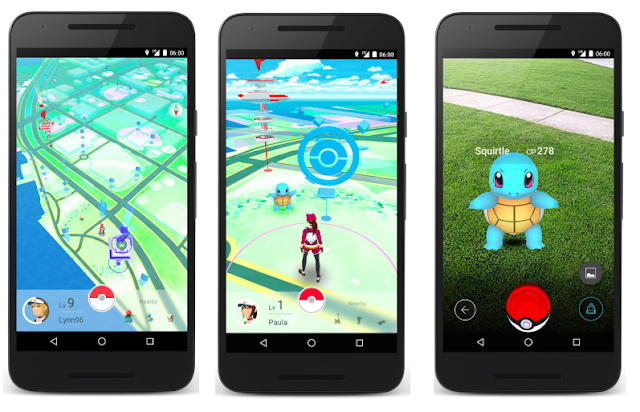
Pokémon GO is spreading widely and now Pokémon freaks living in Australia And New Zealand can now participate in Pokémon GO Field testing program .


You can signup by Going to Pokemon Go website , only lucky users will get a chance to participate in the Pokemon GO Field testing .


Also Read -


Field testing program of Pokémon GO might come to more regions soon ( Countries ) . 

source

Moto X 2016 Image Leaked online , Shows Home button , fingerprint sensor and USB Type C

Motorola and Lenovo are all set up to launch the Next Moto Devices . We are already getting many news about Next gen Moto Devices .


Today a new image surfaced on web , shows probably Moto X 2016 with embedded fingerprint sensor , Home button and USB Type C .


The Home button seems quite small and seems that fingerprint sensor will be embedded to it ( Like Samsung Smartphones have ) .


Moto X 2016 Image Leaked online , Shows Home button , fingerprint sensor and USB Type C

According to info The devices will be coming with a 5.2 inch QHD display , Android 6.0.1 Marshmallow , Fingerprint sensor , Metal Body and USB Type C .

Also Read - Here's How the Next Gen Moto Smartphone Will Look Like

The source of the image is still unknown , but seems that this is it !

Thanks John for tip 


Marshmallow for OnePlus One is in Final testing stage

Marshmallow for OnePlus One is in Final testing stage


OnePlus is all set to release Android 6.0.1 Marshmallow update for OnePlus One . OnePlus One was announced back in April 2014 and the device came with 4.4.2 Kitkat . 


Today Carl Pei ( Co-founder OnePlus ) revealed info about Marshmallow update for OnePlus One on twitter  - 


Marshmallow for the One is in the final testing stage. Can't give ETA as it depends on other parties, but should be very soon.


So , The update is in final testing stage and will be rolled out by OnePlus in few weeks .


2016 Moto X3 cases and covers listed on Flipkart and Amazon

Recently 2016 Motorola smartphone i.e Moto X3 with 5 inch display was spotted on Zauba import listing . Moto X3 seems to be next gen Low end Moto Smartphone .


Also Read - Moto X3 : 2016 Motorola Smartphone spotted on Zauba

Now , New Moto X3 cases and covers are available on Amazon.in and Flipkart . The cases are brand new and were listed on 4th April 2016 . 


According to the Cases Moto X3 seems to be the same Moto Smartphone that was leaked earlier with plastic body .


Even I confirmed from the seller . He said these cases are for new Moto X3 . 


We can see that the cases seems to be of a 5 inch smartphone . The upper space is for Camera , flash and Moto Logo . The lower space is for Lenovo logo .


N-ify Lets you use Android N ( Nougat ) features on Devices running Lollipop and Marshmallow

Recently Google released Android N developer preview , which comes with many new features over Android Marshmallow . Google will release the official Android N later on , but Android N developer preview already gave us a hint , What next Android version will feature .


Non-nexus users have to wait to get Android N ( some of the Android devices will get through custom roms , some will get officially ) . 


But , Now you don't have to wait so long to get Android N features on your Android Device . Those Android devices which are running Android 5.0 Lollipop or Android 6.0 Marshmallow , can get Android N features through N-ify .

N-ify Lets you use Android N features on Devices running Lollipop and Marshmallow
Android N feature : Setting title summary on Android 6.0.1 Marshmallow


N-ify is a xposed module that lets you use Android N features on your Device running on Android Lollipop or Marshmallow .

Currently it supports -

  • Settings tile summaries and 
  • Double-tap recents to switch to last app . 

But soon it will support - 

  • New notifications and quick settings 
  • Night mode 
  • Doze mode when device is moving 
  • Navigation draver in Settings 
  • Use recents button to navigate through recents 
  • Emergency info on lockscreen

You can go to XDA developer , to know more about the module and download it .

How to Install Android 6.0.1 Marshmallow on Samsung Galaxy S Advance I9070

Recently Samsung Galaxy S advance got Android 6.0.1 Marshmallow via Cyanogenmod 13 [ Thanks to Polishvodka ( XDA developer ) ] . 

Read Here - Samsung Galaxy S Advance gets Android 6.0.1 Marshmallow update via CyanogenMod 13


Cyanogenmod 13 ( Android 6.0.1 Marshmallow ) for S advance I9070/P :-

What's Working and What's Not -

  • Boot: working
  • Screen: working
  • Touchscreen: working
  • Wi-Fi: working
  • Bluetooth: working, connected to speaker but no audio
  • Vibrator: not working
  • RIL: phone calling, data working, sms not tested, but probably working too
  • Earpiece: working
  • Camera: working (shooting photos)
  • Camcorder: preview, after hitting record FC
  • Sound: working
  • Microphone: working
  • Sensors: probably working
  • SeLinux: turned off
  • Graphics: 0 glitches, works good (probably)
  • Storage: working (MTP on Windows PC mounts as "sdcard0" and "sdcard1")
  • Recovery: working (TWRP)
BUGS  -  After installing gapps (OpenGapps) keyboard crashes, can't pass setupwizard , You can't access recovery .

Screenshots ( Thanks MAhmud Amin ) -


How to Install Android 6.0.1 Marshmallow on Samsung Galaxy S advance I9070

How to Install Android 6.0.1 Marshmallow on Samsung Galaxy S advance I9070


Pre-requisite -

Rooted Samsung Galaxy Advance with Kitkat compatible Recovery ( Find Here ) .

So , Head ahead to How to Install Android 6.0.1 Marshmallow on Samsung Galaxy S advance I9070 -


1.Download the  CyanogenMod 13 ( Marshmallow 6.0.1 )  Zip , Gapps and Keyboard fix zip from below  .

2.Make sure u have 50% of battery 

3. Put your Samsung galaxy s advance in recovery mode ( Pressing volume up + home button + power button )

4. Clear data and Clear cache  .

5. Select Install zip from sdcard and select CM13 ( Downloaded zip ) . 

6. After installing CM13 , Go to Settings > Apps .

7. In Apps, click the 3 dots on top right, and click "Show System Apps".

8. Now scroll down and find "Setup Wizard" with a green droid logo.

9. Click it and click "Permissions" and enable the 2 permissions.


10. Reboot back to TWRP .

11. Flash Gapps ( Link below ) and then flash Fix file .

12. Reboot !

 Thanks Fireblaze15 ( xda dev ) and mahmud004 ( xda dev )

Downloads -

Cyanogenmod 13 Android 6.0.1 Marshmallow and files - Download Here


source