TechDroider

Moto G4 Plus Leaked : Shows Home Button with Fingerprint scanner

Moto G4 Plus Leaked : Shows Home Button with Fingerprint scanner
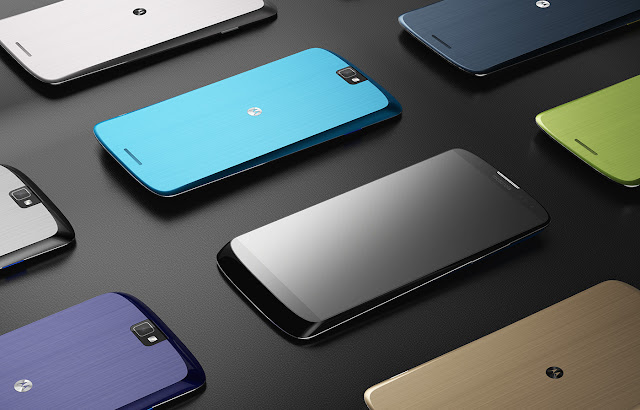
Motorola Moto Concept 


Earlier this month we got a leaked image of unknown Motorola device showing Fingerprint scanner embedded into home button and USB Type C .


Also Read - Moto X 2016 Image Leaked online , Shows Home button , fingerprint sensor and USB Type C

Now the most reliable tipster Evan Blass  ( evleaks ) has leaked the front lower panel of Moto G4 Plus showing Home button ( with probably fingerprint scanner embeded ) .

Moto G4 Plus Leaked : Shows Home Button with Fingerprint scanner

As said earlier by Lenovo " This time Moto Devices will be attractive as well as innovative " . So we are waiting for the Devices  !


The devices are rumored to get launched in July with Android N out of the box .


YU Yureka Note leaked online with 6-inch Display

Seems YU is working on something bigger than a Smartphone and its Yureka Note . So YU is soon going to launch YU Yureka Note with 6-inch Display .

According to the image and specs leaked by Arif Siddique , The device will come with a fingerprint sensor at the back , 3GB RAM , 16GB ROM , Android Lollipop OS .


There will be a dual LED Rear Camera of 13 megapixel and 8 megapixel front camera . The device will come with 4000 mAh battery .

The Device's model no. is YU6000 and will be available at a price of 14,999 /-


Images of  YU Yureka Note -


YU Yureka Note


YU Yureka Note

YU Yureka Note


How to Update Micromax Unite 2 to Marshmallow via Cyanogenmod 13

Micromax Unite 2 A106 users can now install Cyanogenmod 13 which is based on Android 6.0.1 Marshmallow on their Smartphones . 


Micromax Unite 2 came with Android 4.4.2 Kitkat and last year Micromax Officially rolled out Android Lollipop 5.0.2 update to Micromax Unite 2 . Though Lollipop was the last official update , but now users can install Marshmallow ( Cyanogenmod 13 ) on their Micromax Unite 2 .


Thanks to Biswajit Sardar for porting Cyanogenmod 13 for Micromax Unite 2 .

You can update Micromax Unite 2 to Android 6.0.1 Marshmallow by Installing Cyanogenmod 13 .


Watch The Installation Guide Video below -


Watch The Review Video of Cyanogenmod 13 on Micromax Unite 2 -


Downloads -

Cyanogenmod 13 for Micromax Unite 2 - Download Here 

via - unitsolutions


Android N developer preview 2 available now !

Last month Google  released the first Android N developer preview and after many feedback , Google has finally released Android N developer preview 2 .


Android N developer preview 2 has fixed many bugs including ( Wi-Fi networks , Multiwindow Pause , Direct Reply force close , and many more ) .


Android N developer preview 2 available now !


Google has also introduced many new features in Android N developer preview 2 . Some of the features includes - Multi-Window bundled notifications , new human and activity emoji , Launcher shortcuts etc .


You can download Android  N developer preview 2 for supported Nexus Devices from g.co/androidbeta .


Moto Vertex is Motorola's 2016 Smartphone

Few days back we got a leaked Image of Motorola 2016 Smartphone which revealed a fingerprint scanner ( Embedded into home button ) and USB Type C . 


Well , The next generation Moto Smartphone will be Moto Vertex . According to leaked image , Moto Vertex will come with amazing Design and a trendy unlock system ( Probably Fingerprint scanner ) .


Moto Vertex is Motorola's 2016 Flagship
Translated image of  Moto Vertex Poster 


According to weibo user , Lenovo is recruiting staff members to test Moto Vertex Smartphone .


DynamicNotifications Brings Customizable Active Display to all Android Devices

DynamicNotifications also known as Active Notification is an app which lets you use Active Display ( Moto Display for Moto X , Moto G ) , on any Android Device .


Though the application is older , but I installed it few days back on my Moto G 3rd generation and it works amazing  . 


Some of the features of includes -


  • Notifications don't light up when your phone is in your pocket, purse, or face down to avoid accidental unlocks
  • Select which app-notifications you'd like to receive via DynamicNotifications
  • Change the appearance of the app (custom foreground/background color/image, show the date near the clock, change the main notification border style, and more)


You can download the application from Play Store .