TechDroider

Google Pixel December 2022 Feature Drop is now LIVE


Google's most awaited December 2022 Pixel Feature Drop is now LIVE with tons of exciting changes and features for the Google Pixel Devices.

Hear voices clearly.
Pixel enhances the other caller’s voice and reduces their background noise to help you hear them when they’re in a noisy place.

Surround yourself with sound (coming January 2023).
Feel like you’re at the center of the action in your favorite movies and shows. When paired with Pixel Buds Pro, your Pixel supports spatial audio with head tracking for immersive surround sound all around.

Note taking just got easier.
Pixel helps you keep track of who said what in meetings and lectures with more than one participant. It transcribes recordings of multiple speakers by labeling each one and adding line breaks when speakers change.

Extra protection when you’re online.
With VPN by Google One, Pixel 7 and Pixel 7 Pro help protect your online activity no matter what app or web browser you use. With no added cost to you.

Wallpaper that wows.
Bring your Pixel screen to life with the new Live Bloom wallpaper collection. Explore the latest set of custom designs featuring vibrant images that shift and sway when your phone moves.


New cultural wallpapers.
Keep your Pixel screens culturally relevant with the latest Curated Culture wallpapers. This new installment, illustrated by Morgan Harper Nichols, celebrates the International Day of Persons with Disabilities. Morgan is an artist, poet, podcaster, and author whose work is inspired by real-life interactions and stories.


Find it. Fast.
Bring the power of Google Search to your Pixel to search your entire phone and the web, so you can quickly find what you’re looking for – a contact, app, screenshot, setting, and more. Now available for Pixel 4a and later.


Security and privacy, simplified.

Now Pixel makes it easier to protect your phone, accounts, and passwords by having all your security and privacy settings in one place. This includes new action cards that notify you of any safety risks and provide easy steps to enhance your privacy and security.


More ways to lift language barriers.

Live Translate can now translate texts in your messaging apps into more languages, including Arabic, Persian, Swedish, Vietnamese, and Danish.


Understand how you sleep.

Pixel can help you understand what affects your sleep, like coughing, snoring, or how much you’re on your phone at bedtime, now available for Pixel 6 & Pixel 6 Pro.


Get smarter about your sleep.
Gain a better understanding of your sleep quality with helpful insights from Sleep Profile on Pixel Watch. It looks beyond your nightly sleep patterns and tracks your habits and trends over a month-long period. You’ll get a sleep analysis based on 10 key metrics, be matched with one of six sleep animals representing distinct sleeper types, and receive education and personalized metric ranges so you can understand what to focus on to get better rest.


What is The Role of a NOC?

A NOC stands for "network operation center." It's a place where people monitor the state of a network and make sure things operate smoothly.

What is a NOC?

NOC, or Network Operations Center, is a central location where the IT staff monitors and manages any issues with the network. The purpose of a NOC is to monitor data traffic, identify problems and manage those problems.

What is an MSP NOC?


In a nutshell, an MSP NOC is a remote monitoring and management system that you can use to monitor and manage your devices. It's similar to the NOC that you have in your office, but it runs on software-as-a-service (SaaS) technology. This means that it doesn't require any physical infrastructure or hardware on your side; you just need an internet connection to use it from anywhere in the world.

What Does Network Monitoring Do?

NOCs are responsible for monitoring their network traffic. This information can be used to troubleshoot problems, identify trends, and improve performance.

The data collected by the NOC can be used in a variety of ways:

● Network monitoring has many practical uses in IT. It allows you to monitor physical and virtual networks and keep track of both internal and external events that may affect your systems or cause them to fail. It also enables you to define thresholds so you know when something is wrong with one or more devices on your network without having someone physically look at each device every time an issue arises.

When Should You Use Network Monitoring?

● Before a big event, network monitoring can give you an early warning about potential issues with your network, allowing you to plan accordingly and potentially save money. If a large number of people are going to be on the network at once, for example, you might need more bandwidth or servers; network monitoring can quickly let you know if that's necessary.

● After a big event. What if something went wrong at your event? It's always good to have access to historical data so that you can go back through it and see what happened

during this time period in order to try and identify what caused the problem (and how to prevent it).

● Anytime you want real-time visibility into what's happening on your networks (and why).

How Do You Create a NOC?

The first step to creating a NOC is to decide what the acronym stands for. Not every name needs an acronym, but if you want to keep it short, this can be helpful.

Next, decide how large your network will be. For example, will only two people work on it? Or is there room for ten more? How many devices are involved? Do they all connect via Wi-Fi or hardwired cables as well? These questions all play into how much equipment will be required and, therefore, how much money will be needed. If you need any assistance regarding NOC services, you can take the help of experts like Connectwise.

Finally, choose the software or hardware you'll use to monitor and control traffic on your network. Some companies opt for both systems at once; other smaller businesses only use one over another.

The role of a NOC has evolved over the last few years, but it's still an essential part of keeping your network up and running. Today, companies can rely on tools that automate much of the work required by NOC staff. But even in this age of automation, someone needs to be monitoring these systems daily—a job that typically falls on their shoulders.

OnePlus 11 is COMING!


It's Official! OnePlus is all set to launch the OnePlus 11 with Qualcomm’s latest Snapdragon 8 Gen 2 Chipset and YES OnePlus will be one of the first to use this Powerful Silicon. 

In Addition to that, the OnePlus 11 will have Ray-Tracing Hardware Support when playing Games or when Rendering Movies. This means fancier and better reflection in games, like for example we have rain water on road, this new tech will show more realistic colourful image by tracing a path of light. Yeah of-course this is gonna put stress on CPU, but the Snapdragon 8 Gen 2 Chipset is not just powerful but power efficient too.

Snapdragon 8 Gen 2 is based on TSMC Made 4nm chip, the configuration is a main Cortex X3 + two A710, two A715 — and three "efficiency" cores. Qualcomm say the CPU is 30% powerful and 40% power efficient than the 8 Gen 1 we saw in The OnePlus 10 Pro and the GPU is 25% faster and 45% power efficient than the GPU we had in 8 Gen 1.

So overall an amazingly powerful Silicon, the Initial AntuTu Score are 1293000+, yeah ofcourse higher than the Score of Apple A16. We have seen The OnePlus 11 Design, DCS says it is coming with a hexagon shape Module with Sony IMX890 50MP Main and a High Resolution Telephoto Lens, and is going to cost less.

Difference B/W Checking Account and Savings Account

While it's easy to confuse checking and savings accounts, they're actually very different. A checking account is a type of bank account where money can be deposited or withdrawn at any time. A savings account is a type of bank account that allows you to save money for the future and earn interest on it. Both types of accounts offer their own unique benefits, making them ideal for different scenarios.

Purpose

A checking account is a bank account that allows customers to make deposits, withdrawals and transfers with various checks. It is also known as a demand deposit since you can access your money whenever you want by writing out a check or accessing the funds online. The money in the account can be used for immediate payment purposes; however, there are some limitations on when payments can be made using checks (e.g., they cannot be used to pay taxes).

In contrast, savings accounts allow individuals to save money over time without incurring any fees or penalties until it reaches maturity (i.e., after six months). They usually offer higher interest rates than checking accounts because they have lower balances but still offer many features, such as debit cards and direct deposit options.

Average Interest Rates


The main difference between checking and savings accounts is that you can write checks from a checking account but not from a savings account. The ability to write checks has no bearing on what you can earn in interest, however. Interest rates vary by bank and the type of account. For example, online savings accounts tend to have higher interest rates than brick-and-mortar branches do, so if you're looking for high returns on your money, consider opening an online account with a reputable bank.

As per SoFi professionals, "You can earn around 3.00% APY (annual percentage yield) on the savings balances, and around 2.50% APY on your checking balances with direct deposits."

Consider different types of accounts based on your goals for saving money. You also get $300 checking account bonus on signing up with various providers. For example, some people prefer retirement accounts because they offer tax benefits.

Withdrawal Rules


Withdrawals from a savings account are usually limited to six withdrawals per month. You can make unlimited deposits into a savings account, but you might not be able to withdraw money at all if there aren't sufficient funds available. In some cases, withdrawals may incur an early-withdrawal penalty fee if the balance has been held for less than 60 days. However, you can take out cash at any time from a checking account by writing a check or making an ATM withdrawal — no questions asked!

Additional Info


Checking accounts are often used to pay bills and are linked to paper checks, debit cards and online banking.

Savings accounts are for long-term savings and money that you don't want to use right now. Some savings accounts can be used as overdraft protection for your checking account - but it's important to find out what the terms and conditions are before you commit.

In conclusion, checking and savings accounts are important financial tools for individuals. The main difference between the two types of accounts is that a checking account provides access to funds through ATM withdrawals or debit card purchases, while savings accounts allow depositors to earn interest on saved money without incurring monthly maintenance fees.

How To Use A Speech Analytics Solution For Sales?

Speech analytics solution is an essential tool for salespeople. It helps you learn about the buyer's journey, determine which touchpoints to analyze and identify where your leads might be falling through the cracks. In this article, you'll see how to use speech analytics software in your sales process.

While implementing a speech analytics solution can greatly improve your sales strategy, creating a structured business entity can also lead to increased success. If you're considering this path, you may want to learn about How to Create an LLC to protect your personal assets as you grow your business.

Analyze the buyer's journey


Your buyer's journey is the path a buyer takes from first hearing about a product or service to purchasing it. This can be analyzed and optimized with the help of speech analytics software, which can pinpoint all vital stages of your customer's decision-making process.

The buyer's journey is different for every product or service, so you need to figure out what yours looks like before you decide how best to use your speech analytics software. This will help you determine where along their buying journey, customers are losing interest in what you're selling them.

Determine which touchpoints to analyze


Now that you better understand how to use speech analytics for sales, it's time to start using it. But where should you start? The first thing to do is determine which touchpoints to analyze.

Some businesses will be able to use speech analytics in the lead generation phase, and others will only be able to apply it during the sales call. If this is the case with your business, then experts recommend starting with analyzing calls rather than leads because they are easier and quicker. After all, if something doesn't work in your initial test phase, no harm isn't any harm done unless any money is spent.

Apply speech analytics to the lead-generation phase

Speech analytics solution is a great tool to use when it comes to lead generation. This is because it allows you to track what kind of language and tone your leads respond to and how efficient their conversations are. For example, suppose a lead needs to respond more quickly when you send them information about your product or service. In that case, you can use speech analytics software to determine whether they prefer phone calls over emails or vice versa.

Analyze sales calls

The first call you should analyze is the call that was lost. After, you can analyze the calls won by your team and then compare those to the calls that were in between: neither won nor lost.

If you are using speech analytics tools for sales, you will be able to see this information in a dashboard format. You can also download it into an Excel spreadsheet or export it into another program like PowerPoint or Google Sheets. This will allow for easy analysis of trends over time and make it easier to share with managers and coworkers in your department so that everyone understands why specific tactics work better than others at different times throughout the year.

"Discover ways to take your transcription and comprehension accuracy to the next level," says Verint experts

So, what are you waiting for? With speech analytics tools, you can analyze your sales calls and increase your conversion rates. All you need to do is identify the touch points that matter most for your business, define how to measure them and then start using the tool. It's really simple – just follow the steps we outlined above and you will see results!

Download OnePlus Official Customization Pack - Fingerprint Animations and Live Wallpapers

Download OnePlus Genshin Impact Edition Fingerprint Scanner Animation and Live Wallpapers


OnePlus Genshin Impact Full ZIP (OxygenOS 13 and OxygenOS 12)

Download - Google Drive |

All Credits to Pavlova UI Newsroom - Channel Link

Install It as normal APK.


How to Uninstall these Fingerprint Animations and Live Wallpaper

Go to Settings - Apps - App Management (All Apps) - Search for Pacman or Genshin Impact (Whatever you Installed) - Open It - Tap on Three Dots - Select Uninstall for all users. Done.


Download iPhone 14 Dynamic Island for Android [Updated]


The Main Highlight of iPhone 14 Pro Max is the Smartly done Dynamic Island. Today, I'll Show how to get iPhone 14 Pro’s Dynamic Island and iOS 16 features on devices like Samsung, OnePlus, Xiaomi and Google Pixel.

What is Dynamic Island? 


How to get Dynamic Island on Android? (New Application)


New Application works on Both Center and Side Hole Punch + Shows Notifications, Charging, Music Player and also Connected Devices.


Download - Vientiane Smart Island


Original Article (Old Applications)


Get iPhone 14 Features on any Android Smartphone (Download at your Risk)

Smart Widget Box

MIUI Theme Name - 怪脾气UI | Direct MTZ Theme Download

iOSiFy (KWGT)


Above Video Shows the Dyamic Island on Android and iOS 16 Widgets

iPhone 14 Pro Max All Colors (Model) Hands On

Samsung OneUI 5.0 (Android 13) Features Review on Galaxy S22 Ultra

OnePlus OxygenOS 13 (Android 13) OFFICIAL

Nothing OS vs OxygenOS COMPARISON - WHICH SHOULD YOU USE?

Snapdragon 8+ Gen 1 vs Snapdragon 8 Gen 1 - SPEED TEST

Xiaomi 12S Ultra BATTERY DRAIN TEST!

Honor Magic 4 Pro Unboxing and Review

Google Pixel 7 Pro Concept is HOT!

iPhone 14 Models - UNBOXING!

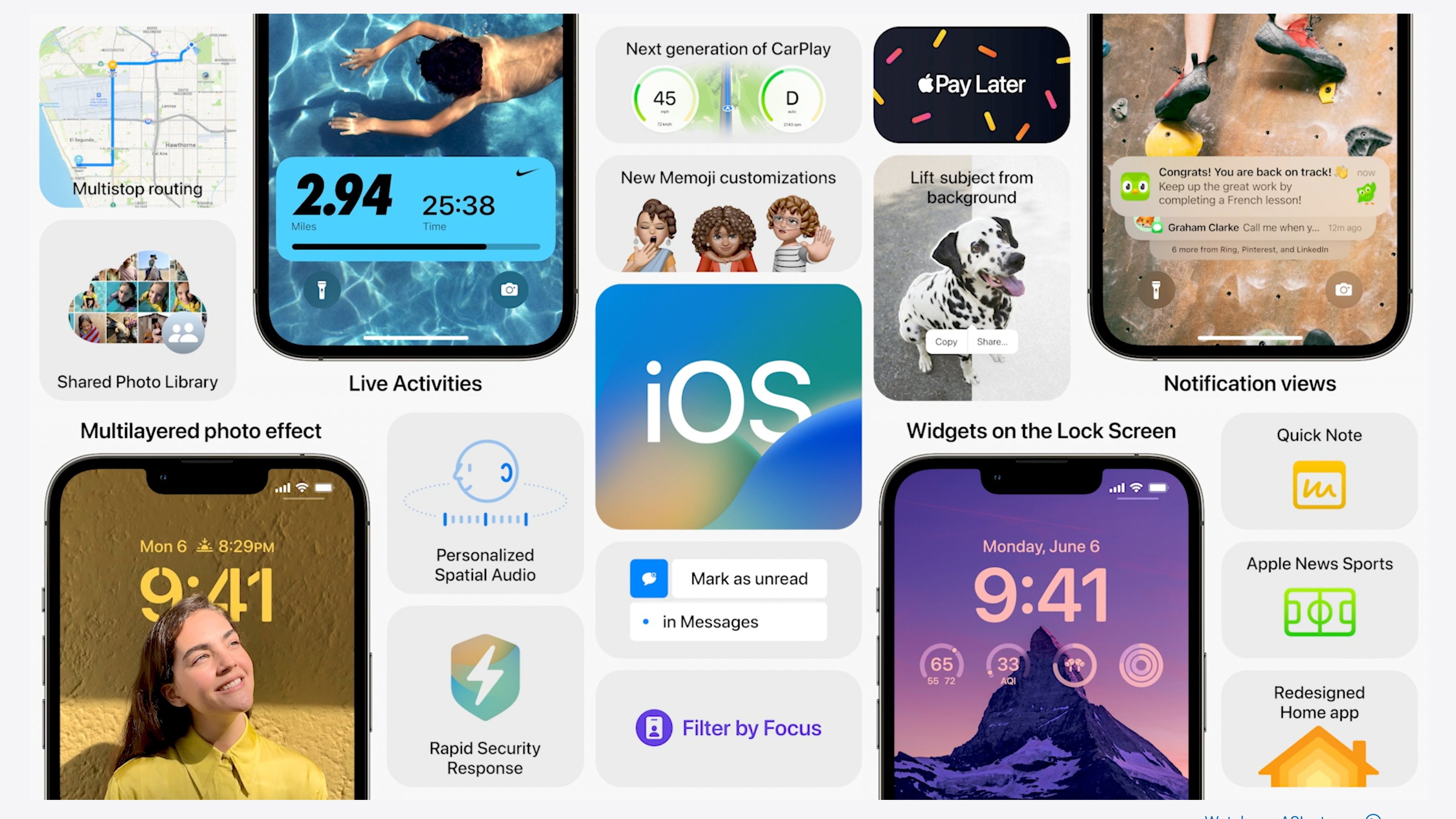
Apple iOS 16 Goes OFFICIAL

 Apple has Finally made iOS 16 Official and it comes with Exciting new Changes and lots of new Features. The iOS 16 will be available for Developers and later as Public Beta. 


So the iOS 16 Lockscreen is getting a Major UI Change, It is now Customisable, You can Personalise accordingly which works way better than Google's version of Material You for Lockscreen, and Apple has added tons of Color Pallet Option for theming Lockscreen Clock. 


The new iOS 16 also comes with bunch of new Memoji Collection, We've new Notification Piles and New Parental Control Section which is going to help you in your daily usage and task. 

Apple has finally added a new Fitness Application in the iOS 16, best part is you won't even need Apple Watch to use the Fitness Data. So, iOS 16.. Yay or Nay?


How to Install Android 13 on any Smartphone [Download]

Google Android 13 is now Official. It comes with all New Material You. It is Safe, is Secure and made to adapt with you. Google say Android 13 is based on everything you love about Android and it focuses on building a personal phone that adapts to your usage, it is secure by default and privacy by design (Cool lines Google), and this all makes your devices work better together.


Note - We've used Google Official Guide to Install Android 13. We are not responsible for data loss, bricked devices, dead SD cards, broken IMEI, or broken features. Download and Install it on your own Risk.


How to Install Android 13 on any Smartphone


Download Links (Manual Install via PC)


Device Driver - Download via Developer Android (Google)


SDK Fastboot and ADB - Download via Developer Android (Google)


How to Install ADB on Windows / MacOS / Linux - XDA Guide


Pixel 4 (Stable Android 13 Beta) GSI - Download ( Via NIPPON GSI) (April, 2022)


AOSP GSI - Download via Developer Android (Google)


If you're a OnePlus user and Want to Extract VBMeta and Boot.img from OxygenOS Firmware - Follow this Guide 


Commands Windows


fastboot flash boot_a boot.img
fastboot flash boot_b boot.img

fastboot -w flash system <your Treble ROMs name>.img

fastboot --disable-verity --disable-verification flash vbmeta vbmeta.img

fastboot reboot


Commands MacOS

cd /Users/ <Folder name> /Desktop/platform-tools/

./fastboot flash boot_a boot.img
./fastboot flash boot_b boot.img

./fastboot -w flash system <your Treble ROMs name>.img

./fastboot --disable-verity --disable-verification flash vbmeta vbmeta.img

./fastboot reboot


Nothing Phone 1 - Nothing OS BEST LOOK


Nothing is all set to launch the Nothing Phone 1 and the highlight of that device is it's Nothing OS which is coming with some Exciting features and changes. The Nothing OS will be based on Google's Android 12 and Nothing plans to use it's own Retro Dot-Matrix Design language, this along with using most Google apps with Material You Finish.

The launch event gave us some hints what to Expect from Nothing OS, So we made a Concept accordingly. The Most Exciting Part of Nothing OS is of-course the Quick Settings, coz it is way different than basic Pixyish or OnePlus, Samsung’s Interface. Yeah you guys can see on top we’ll have two circular elements containing the information about your data pack, or balance, and connected devices with the battery level. In this Image, you guys can see the swipe-able interface, Tesla and Nothing ear 1 are connected devices and when you tap on that, you’ll see this pop-up menu with tons of options, so I guess one can control the connected devices easily from there. Nothing Says Non-Nothing devices will also connect with NOTHING os, that is gonna be awesome.


Nothing Official Launcher is live on Play Store, this is a basic launcher with basic icons, but we do have sone Dot-Matrix widget, like this cool weather widget, Digital and Analog clock. You guys can select a transparent or solid style of Digital Clock. Fun part is you can enlarge an icon which you use most, like I use twitter a lot, so it is gonna be easy for me to find and click on that app.

Nothing is also working on their icons, which I guess may look like this, icons made from dots, and I hope they give us an option to turn off and turn on the Dot theme. Nothing says this OS will be bloatware free, so no third part apps I guess, and Nothing of course is working with Google for this OS, they’re using almost all Gapps, so I think will surely see Material You design interface in there. Yes Google has done so many nice changes, like all Nothing has to do is, use them, So yeah again I think Pixel style Interface all over with Material You finish, some Nothing Exclusive Addons like Widget, Voice Recorder, Music Player and of course the awesome Quick Settings interface which I hope can connect to and control all smart devices with an ease.

Samsung Smartphones getting OneUI 4.1 (Android 12) Official Update


Samsung has started rolling out Official Android 12 OneUI 4.1 Update for Galaxy Smartphones. OneUI 4.1 first came with the Galaxy S22 Series with some new features.

Samsung OneUI 4.1 (Android 12) will be soon available for Galaxy S21 Series (Samsung Galaxy S21 FE), Latest Galaxy A Series and Tab S7 FE. Samsung plans to extend it to even more devices - S20 Series, Z Fold, Z Flip, Note Series, S10 Series, Galaxy A and Tab S Series in the coming months.

Some Exciting OneUI 4.1 Features includes iOS Style Smart Widget which won’t need much space and can swipe between different widgets allowing users to keep a single widget on screen, saving space, and at same time you guys can use all widgets like clock, Samsung notes, date and time. There are new Quick Settings as well, Samsung have done small changes in the Text, it is now Medium than Bold in OneUI 4. Now I’m gonna show you guys the Animation and System Apps Interface, but there are small changes, but you won’t notice much.


In the Camera application Pro mode, you can now switch to Main, Ultra Wide, Telephoto 3x and Telephoto 10X, in ONEUI 4 it just Wide and Main. There are some new features in the Settings, like the Storage Section has an Option RAM Plus, which is like a visual RAM, by default it was 4 Gigs in OneUI 4, and now in 4.1, you can choose 2 Gigs to Max out 8 Gigs. 

Finally the Lockscreen Wallpaper service has a new option Samsung Global Goals, you can get daily messages about the figures, on how much change Samsung have done in the society, so a nice initiative. The OneUI 4.1 is not only about the Features, but the animation is now faster than ever and I really like this change. This is Samsung OneUI 4.1 vs Pixel OS, and honestly speaking, I like the Color Pallet Picker of OneUI.

/ Samsung Newsroom | Samsung Galaxy S21 FE