TechDroider

Nokia's 7 Plus to have 18:9 display and an advance dual cameras

Nokia's 7 Plus to have 18:9 display and an advance dual cameras
Nokia 10 Concept
2017 was HMD's most successful year ever as Nokia phones sales soar. It seems that the company is planning to launch a bunch of Android Smartphones under Nokia brand in 2018.

Back in December 2017, we learned about the Nokia 7 Plus and other unannounced Nokia Smartphones via refrences inside Nokia Camera application. But now we have confirmed specifications + images of the Nokia 7 Plus, thanks to a new leak.


As you can see in the below image, the Nokia 7 Plus looks exactly similar to the Nokia 7 in terms of rear design but has dual-rear cameras and a 6 inches 18:9 display. On the Specificiation side, the Nokia 7 features Snapdragon 660 CPU which is of course faster than the Snapdragon 630 used in Nokia 7. It has 4GB RAM, 64GB internal storage expandable up to 128 GB with MicroSD.
Nokia's 7 Plus to have 18:9 display and an advance dual cameras
Taking a look at the Camera specs, we have 12MP + 13 MP with ZEISS Optics, 2X optical zoom, f/2.0 aperture, Dual PD all pixel focus, Nokia Pro Mode app, and Bothie.

HMD may announce the Nokia 7 Plus along with the Nokia 9 at MWC in Barcelona, Spain. Stay tuned to our Facebook and Twitter page to get the first News.


Image: Concept Creator | Via: Ithome


January 2018 Security update is now live for Moto X4 Android One owners

The Moto X4 Android One is now getting the latest Android security patch, bug fixes, and improvements.

If you own a Moto X4 Android One you should have received the over-the-air update notification for January 1, 2018 Android security update. New software update for the Moto X4 brings along Bug fixes and Stability improvements. The new build number is OPWS27.1.1. Stay tuned to our Facebook and Twitter page to get the first News.


Motorola’s instructions explain that for a successful installation, the battery in your phone should be at least 50% charged and your device should be connected to a Wi-Fi network or LTE.

If you haven't got the notification of this new software update yet, Just go to Settings - About Phone - Software updates, and It will automatically start downloading the latest update. The update will take around 10-15 minutes to get Installed on your device.
January 2018 Security update is now live for Moto X4 Android One owners

Moto X4 - Maintenance Release Notes

INTRODUCTION

Motorola is excited to announce a new software update for moto x4 by Motorola. This update brings important security improvements to your phone.

For more information on Motorola updates and repairs, visit us at www.motorola.com/mymotox.

NOTE: All information on your phone will be saved. You cannot downgrade to a previous software version after installing this update.

ENHANCEMENTS

This update introduces changes including the following:
Android security: Includes the updates of Android security patches through January 1st, 2018.

January 2018 Security update is now live for Moto X4 Android One owners

r/MotoX4 (onemanwufpack)

Download: Samsung Galaxy S8/S8+ and Note8 Android Oreo build with February Security Patches

You can now download and install the latest Android 8.0 Oreo firmware with February Security Patches on your Samsung Galaxy S8, Galaxy S8 Plus, and Galaxy Note8 Devices.

The leaked firmware of February Security Patches with Official Oreo has been made available online and comes with build R16NW.G955USQU2CRB1 for the Samsung Galaxy S8 and R16NW.N950USQU3CRB1 for the Samsung Galaxy Note 8.

XDA notes that these builds are able to be installed from the stock Samsung recovery, and are 100% safe to install. You can install them by first flashing version BQL1 via Odin on the Samsung Galaxy S8 and Galaxy S8+, and flashing version BRA8 on the Samsung Galaxy Note8.

After installing the above firmwares you can sideload the OTA zip file via ADB. Note that ths procedure will erase the data on your phone. Stay tuned to our Facebook and Twitter page to get the first News.

Download software version BQL1 for the Samsung Galaxy S8 | Download Android Oreo OTA with February Patches for the Samsung Galaxy S8

Download software version BQL1 for the Samsung Galaxy S8+ | Download Android Oreo OTA with February Patches for the Samsung Galaxy S8+

Download software version BRA8 for the Samsung Galaxy Note8 | Download Android Oreo OTA with February Patches for the Samsung Galaxy Note8

Via: XDA

Moto Z2 Force on Verizon gets January 2018 Security Update

Moto Z2 Force on Verizon gets January 2018 Security Update
The Moto Z2 Force on Verizon just got a new software update with latest Android security patch, bug fixes, and improvements.

If you own a Moto Z2 Force you should have received the over-the-air update notification for January 1, 2018 Android security update. The new build number is ODXS27.109-34-4. Changelog says that the update also includes Meltdown and Spectre security patches. Stay tuned to our Facebook and Twitter page to get the first News.


Motorola's instructions explain that for a successful installation, the battery in your phone should be at least 50% charged and your device should be connected to a Wi-Fi network or LTE.

If you haven't got the notification of this new software update yet, Just go to Settings - About Phone - Software updates, and It will automatically start downloading the latest update. The update will take around 10-15 minutes to get Installed on your device.

[Download APK] Moto Camera with Spot Color for Moto G5s Plus

[Download APK] Moto Camera with Spot Color for Moto G5s Plus
Last night, we told you that the Moto G5s Plus is now getting a new Camera update with Moto X4's Spot Color feature which creates artistic photos by preserving one color in the frame and keeping other elements in monochrome.

The new Moto Camera 2 update is already available on Play store as version 7.1.9.6. If you haven't recieved the update you can manually install it by downloading and install the below .apk file (Thanks to XDA member Saadatrm.)

Download: Moto Camera (XDA)

Nokia 8 Price Falls by up to Rs 8,000; Here's the New Price!

Nokia 8 Price Falls by up to Rs 8,000; Here's the New Price!
Back in September 2017, HMD announced the flagship Nokia 8 in India with top-notch specs and ZEISS Optics. The entire package was offered at a price of Rs 36,999 and according to retailer Mahesh Telecom, it is now available at Rs 28,999, following a drop of Rs 8,000.

The Nokia 8 features a 5.3-inch QHD IPS display with huge chin and top bezels. It is powered by the Snapdragon 835 SoC, 4GB of RAM, and 64GB of internal storage. The phone comes dual rear cameras with Zeiss Optics, Splashproof (IP54), OZO 360-degree Audio, and includes USB Type-C port, Bluetooth 5.0, and NFC. The phone runs Android 7.1.1 Nougat.

The attraction for the phone is it's "Bothie" feature, which allows you to use both the front and the rear Camera's together. Another feature that might wonder you is its OZO Audio, which gives 360-degree sound with amazing quality. At the back, there are two cameras of 13MP with Zeiss optics along with an 13MP front-facing camera.

The Nokia 8 will be available in Polished Blue, Tempered Blue, Steel, Polished Copper Colour options. The device will pack a 3090mAh battery with quick charge support.

Moto Z Play Official Android 8.0 Oreo Beta [Screenshots]

Moto Z Play Official Android 8.0 Oreo Beta [Screenshots]
Just a few weeks back, Motorola started recruitment for Android Oreo beta testers for the Moto Z Play and today the company has started rolling out the update to the eligible users in the US and India. While this is only a beta program, it's still good to see that Motorola is working on bringing the latest version of Android for its users.

Android 8.0 Oreo Soak Test for the Moto Z Play comes with numerous enhancements over Android Nougat, such as faster booting, new Settings and Quick-Settings UI, Picture in Picture (PIP), Adaptive icons, Autofill, Notification timeout, Motorola has also added several new features to the latest software update. Android 8.0 Oreo update for the Moto Z Play also brings the latest January 1st 2018 Security Patch, Stability and Camera improvements.


While the company has not revealed date of the official rollout of Android Oreo, it is believed that Motorola might release the official update by Mid Feb. Stay tuned to our Facebook and Twitter page to get the first News.

Below are some screenshots of the Android 8.0 Oreo Beta for Moto Z Play.


Cheers: LovinVEVO (XDA Member)


Moto G5s Plus gets Spot Color with new Camera update

Moto G5s Plus is now getting a new Camera update with Moto X4's Spot Color feature which creates artistic photos by preserving one color in the frame and keeping other elements in monochrome.

The new Moto Camera 2 update arrives as version 7.1.9.6. The update is already rolling out to the users of Moto G5s Plus from January 30. If you did not receive the update try checking for it manually by heading over to My Apps section in the Play Store.

[Update] [Download APK] Moto Camera with Spot Color for Moto G5s Plus

Moto G5s Plus Picks Up January 2018 Security Patch

Moto G5s Plus Picks Up January 2018 Security Patch
Moto G5s Plus has picked up a new software update that introduces the January 2018 security patch.

If you own a Moto G5s Plus in Brazil you should have received the over-the-air update notification for January 1st, 2018 Android security update. That’s all that is detailed in the new software version (NPSS26.116-64-2), though there is a mention of "KRACK" Fix. It’s a WiFi vulnerability that breaks WPA2 by forcing nonce reuse.


Motorola’s instructions explain that for a successful installation, the battery in your phone should be at least 50% charged and your device should be connected to a Wi-Fi network or LTE.

If you haven't got the notification of this new software update yet, Just go to Settings - About Phone - Software updates, and It will automatically start downloading the latest update. The update will take around 10-15 minutes to get Installed on your device. We will let you know once the update is out for other countries. Stay tuned to our Facebook and Twitter page to get the first News.

Android P 9.0 is Coming Soon!

Android P 9.0 is Coming Soon!
The last time we updated you on the status of the Google's upcoming Android P, we told you that it was in the works and will be called Android Pi which is shorthand used for Android Pie. We also told you that Google is expected to release it at Google I/O which is happening on May 8th.

According to the latest commits in AOSP (Android Open Source Project) Google is finalizing Android P DP1 for eligible devices.

Just like every year, Google is expected to reveal the next version of Android OS, "Android P" followed by Multiple Developer Previews and a Full launch. This latest Android OS will reportedly come with new "smart features."

Mishaal Rahman‏ (Editor-in-chief at XDA) says that the first Developer Preview of Android P might hit on 3/14/18.

Via: Mishaal Rahman‏ | Source: AOSP

Moto Z Play getting Android 8.0 Oreo soak test in India

Moto Z Play getting Android 8.0 Oreo soak test in India
The last time we updated you on the status of the Moto Z Play's Android 8.0 Oreo update, we told you that it was in the works and the release is imminent. Well, it looks like Motorola and Lenovo are finally pushing early beta build to the MFN users.

If you own a Moto Z Play in the India and have enrolled to Motorola Feedback Network, you should have recieved a notification for Android 8.0 Oreo Software Update with build number OPN27.74.


Android 8.0 Oreo Soak Test for the Moto Z Play comes with numerous enhancements over Android Nougat, such as faster booting, new Settings and Quick-Settings UI, Picture in Picture (PIP), Adaptive icons, Autofill, Notification timeout, Motorola has also added several new features to the latest software update. Android 8.0 Oreo update for the Moto Z Play also brings the latest January 1st 2018 Security Patch, Stability and Camera improvements.

Related: Here's What's New In Android 8.0 Oreo For Motorola Phones

Assuming the test rolls out smoothly, those of us not in the test could see the update within a week or two. Once Motorola announces an official rollout of the update for all, we shall let you know. Stay tuned to our Facebook and Twitter page to get the first News.

Moto Z Play getting Android 8.0 Oreo soak test in IndiaMoto Z Play getting Android 8.0 Oreo soak test in India

Credits: Mohammed Mustafa (Moto Z Facebook Group) | Featured Image: Motorola-phone RU

OnePlus 5T gets new update, OxygenOS pushed to Open Beta 3

OnePlus 5T gets new update, OxygenOS pushed to Open Beta 3
OnePlus is pushing a new software update to the users of OnePlus 5T in the form of OxygenOS Open Beta 3. With the latest update, the company is fixing various bugs along with some new features as well.

The update brings a new pick-up gesture switcher to the Phone application. Now, you can choose whether to lift an incoming call by swiping down or up the screen.


Phone
  • Added pick-up gesture switcher
    • You can now choose which way you slide (up or down) to pick up a phone call
System
  • General bug fixes and improvements
  • Removed Clipboard function
    • Thanks for your feedback, we removed this feature based on that.
  • Applied CPU security patch: CVE-2017-13218
  • Added new Navigation gestures that you can enable by going into settings and disabling the nav bar.
India only
  • Added SMS categorization function for India only
    • This is an India only feature that auto-sorts your SMS messages into categories
Besides, the company has removed the Clipboard function which was found sending users data to Chinese servers. The update also brings new security patch CVE-2017-13218 and new Navigation gestures that you can enable by going into settings and disabling the nav bar.

The update is currently rolling out for the users under OpenBeta OS, and later on, all the features will be added to the stable build of the OS. Have you received the update? Let us know in the comments section below. Stay tuned to our Facebook and Twitter page to get the first News.


OnePlus 5 OxygenOS Beta 5 removes Clipboard; Here's What's New!

OnePlus 5 OxygenOS Beta 5 removes Clipboard; Here's What's New!
OnePlus is pushing a new software update to the users of OnePlus 5 in the form of OxygenOS Open Beta 5. With the latest update, the company is fixing various bugs along with some new features as well.

The update brings a new pick-up gesture switcher to the Phone application. Now, you can choose whether to lift an incoming call by swiping down or up the screen.


Phone
  • Added pick-up gesture switcher
    • You can now choose which way you slide (up or down) to pick up a phone call
System
  • General bug fixes and improvements
  • Removed Clipboard function
    • Thanks for your feedback, we removed this feature based on that.
  • Applied CPU security patch: CVE-2017-13218
India only
  • Added SMS categorization function for India only
  • This is an India only feature that auto-sorts your SMS messages into categories
Besides, the company has removed the Clipboard function which was found sending users data to Chinese servers. The update also brings new security patch CVE-2017-13218. 

The update is currently rolling out for the users under OpenBeta OS, and later on, all the features will be added to the stable build of the OS. Have you received the update? Let us know in the comments section below. Stay tuned to our Facebook and Twitter page to get the first News.


Screenshots: Android 8.0 Oreo on the Nokia 6

Screenshots: Android 8.0 Oreo on the Nokia 6
Android 8.0 Oreo is already rolling out to the users of Nokia 6 in phases. If you did not receive the update wait for few days or try checking for it manually by heading over to system updates section in the Settings app.

Android Oreo comes with numerous enhancements over Android Nougat, such as faster booting, new Settings and Quick-Settings UI, Picture in Picture (PIP), Adaptive icons, Autofill, Notification timeout, Nokia has also added several new features to the latest software update. Android 8.0 Oreo update for the Nokia 6 2017 also brings the latest January 1, 2018 Security Patch.

Nokia Changelog says that the new version includes Update Settings UI, Screen and Pedometer card, Enhance Power saving and background activity manager, Enhance Low Light Camera Image Quality, Nokia Cloud, Notification wake up, and long screen capture.


Well, without further ado, here are screenshots of Android 8.0 Oreo on the Nokia 6 (Thanks to Roland Quandt - @rquand). Let us know how you’re liking Oreo on your phone by leaving a comment! Stay tuned to our Facebook and Twitter page to get the first News.

Screenshots: Android 8.0 Oreo on the Nokia 6Screenshots: Android 8.0 Oreo on the Nokia 6

Nokia 6 is getting Android 8.0 Oreo: Here's What's New!

The Nokia 6 2017 is now getting Android 8.0 Oreo. The update is now available for both Global and Chinese variant of the Nokia 6

Android Oreo comes with numerous enhancements over Android Nougat, such as faster booting, new Settings and Quick-Settings UI, Picture in Picture (PIP), Adaptive icons, Autofill, Notification timeout, Nokia has also added several new features to the latest software update. Android 8.0 Oreo update for the Nokia 6 2017 also brings the latest January 1, 2018 Security Patch.


Nokia Changelog says that the new version includes Update Settings UI, Screen and Pedometer card, Enhance Power saving and background activity manager, Enhance Low Light Camera Image Quality, Nokia Cloud, Notification wake up, and long screen capture.

The update is already rolling out to the users of Nokia 6 in phases. If you did not receive the update wait for few days or try checking for it manually by heading over to system updates section in the Settings app. Make sure you've at least 50 percent juice left on your phone before updating it. Stay tuned to our Facebook and Twitter page to get the first News.

Geekbench Reveals Nokia 7 Plus Features

Geekbench Reveals Nokia 7 Plus Features
2017 was HMD's most successful year ever as Nokia phones sales soar. It seems that the company is planning to launch a bunch of Android Smartphones under Nokia brand in 2018.

Back in December 2017, we learned about the Nokia 7 Plus and other unannounced Nokia Smartphones via refrences inside Nokia Camera application. But now we have confirmed specifications of the Nokia 7 Plus, thanks to Geekbench.


The Nokia 7 Plus would feature Snapdragon 660 CPU which is of course faster than the Snapdragon 630 used in Nokia 7. The device would also feature 4GB of RAM and Android 8.0 Oreo Operating System.

Nokia 7 Plus is also expected to come with 18:9 Full Screen Display, Dual Rear and Front Cameras. HMD may announce the Nokia 7 Plus along with the Nokia 9 at MWC in Barcelona, Spain. Stay tuned to our Facebook and Twitter page to get the first News.


//Geekbench

How to Prepare Media Files for Various Devices

How to Prepare Media Files for Various Devices

Nowadays we have thousands of different gadgets to watch videos on: mobile phones, tablets, gaming consoles, PCs and laptops, MP3 players and TV sets. At the same time, video files come in numerous formats such as AVI, MKV, MP4, MPEG, 3GP, FLV, and others. The majority of modern devices support a universal MP4 format. But what if you have an old device? The answer is simple: you’ll need special software called video converter to transform the videos to a format supported by your device. Besides that, a right program will let you convert a video with the settings that exactly match your gadget and thus will improve your overall video watching experience. You may find a lot of video converters in Google search. However, keep in mind that the software should be reliable and trustworthy. Thus we recommend Freemake Video Converter. The tool can be downloaded here: http://www.freemake.com/free_video_converter/

The software was developed in 2010 and since then has been installed by millions of users. Freemake Video Converter was nominated as Best Video Converter by such popular tech resources as PC Advisor, Chip, PC World, and others.

What makes Freemake stand out from the crowd is its beautiful and user-friendly interface and multiple options for video converting and editing. Let’s learn how to prepare your media files for playing on different devices with this software.

The first thing to do is to download the program following the link above and install it on your PC or laptop. The software can run on Windows Vista, Win 7, 8, and Windows 10. Win XP is no longer supported.

Be attentive during the installation. The software might ask you if you want to integrate all media files with Freemake. If you are OK with it, continue the installation process. If you want to keep your default player, deselect this option.

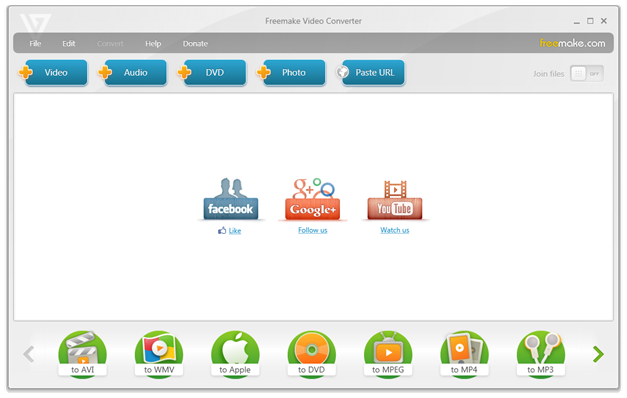
When the installation process is completed, run Freemake Video Converter. You’ll see a bright interface with big colorful buttons. At the top of the software there are “+Video”, “+Audio”, “+DVD”, and “Paste URL” options. They serve to add media files into the program. According to the information on the official website, the software supports over 500 audio and video formats for input. Please note that your files must not be protected. Freemake doesn’t support such type of files since it can’t remove the protection.
How to Prepare Media Files for Various Devices

Output format choices are not so numerous but contain all major formats you might need AVI, MP4, MKV, MPEG, etc. Click the arrow sing in the bottom right and left corners to check for more output options. If you move a cursor to a format, you’ll find a start star that lets you add a particular format in Favorites and always have on the main screen of Freemake Video Converter. Among the regular format buttons, you will also see such option as to Apple, to Android, to Sony, to Nokia, and others. Each of these options contains some ready presets for most popular gadget models.

Convert videos to your device

To convert your videos, simply drag-n-drop them into the software or use the +Video button. In case you just need to convert videos to your device, choose your device manufacturer (Sony, Apple, Blackberry, etc.), then click on the drop-down menu and select your device model. After then click the Convert button to launch the conversion process. By default, your converted videos will be saved to My videos folder. However, you can always change the destination path before starting the conversion. You can find this option right above the Convert blue button.

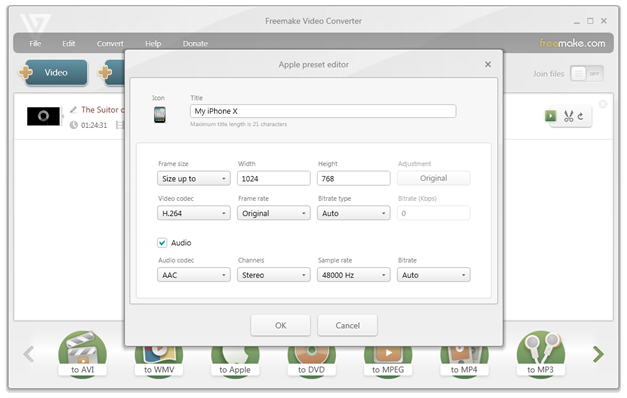
If you didn’t find your device model among the ready presets, choose the Add custom preset option. You’ll see a new window where you can select such settings as framerate, bitrate, video and audio codecs, frame size, and some others. Check what exact settings are supported by your gadget before changing anything. When you are done, add a title to your new preset and save it for future use.
How to Prepare Media Files for Various Devices

For TV sets the procedure is pretty much the same. The only difference is that first of all you should select a video extension supported by your TV.

Convert DVDs to your device

Freemake Video Converter allows you to rip non-protected DVDs and watch them on mobile phones, tablets or modern TVs. To add a DVD, you can either use a corresponding +DVD button or drag-n-drop the VIDEO_TS folder into Freemake. Please note that if your DVD has several audio and subtitles tracks, you should pick the one you need. Freemake doesn’t support adding several audio or subtitles files to one video.

To do it, pay attention to the video line when the video is in the software. You’ll see audio parameters such as MP3, AAC or WMA and some symbols. Click these settings to see the drop-down menu and select an audio track. To preview your choice, click the button with scissors to the right of the video to run Freemake editor.

The rest of the process is the same as for a regular video. Choose your device model and rip your DVD.

Convert YouTube to your device

There are thousands of amazing video on YouTube. No double sooner or later you might like to save your favorite ones for offline watching. Freemake Video Converter will help you here. To download YouTube video with Freemake, go to YouTube website and copy a link to the video that you want to save. Please keep in mind that the software doesn't download paid YouTube movies even if you have purchased them.

Return to Freemake and click the Paste URL button to add YouTube link. Then follow the steps that you have already learned.

Edit videos for your device

Freemake Video Converter comes with a built-in video editor. There are not many features, but you can remove unnecessary videos parts such as ads or adult scenes, rotate videos, and join them into one complete film.

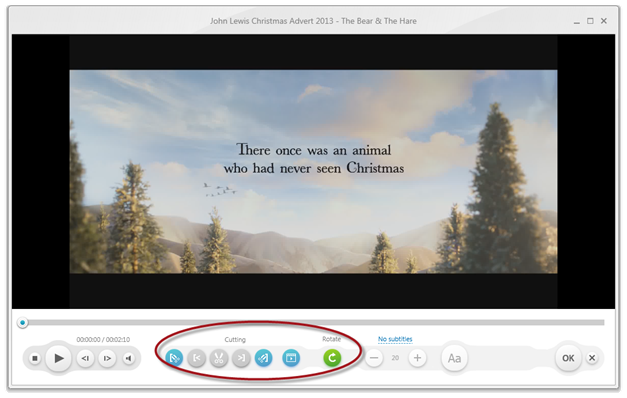
To make changes to your video, run Freemake editor as described earlier. To cut a video, use a left scissors button to mark the beginning of the part you need to remove, then a right scissors button to set the end of this part. Clicking on a central scissors button will remove the part. Then click the OK button and convert your video to apply changes.

To rotate a video, use a round arrow button. As for the join feature, add several videos you want to merge and enable and pay attention to the top right corner of Freemake Video Converter. You’ll see a toggle that you need to move to the right to enable join feature. After that, choose a video format and start the conversion process.
How to Prepare Media Files for Various Devices

Besides theses simple changes, you can also add subtitles to your movie in case it's in a foreign language. The tool accepts subtitles in SRT, ASS, and SSA formats. Keep in mind that subtitles colors and fonts are not supported. If you don’t have a subtitles file on your PC, you can search for it online. There are many websites that provide movie subtitles.

All in all, Freemake Video Converter is a great utility for those who prefer to watch high-quality videos adapted for a particular device model. With this software, you get a simple video editor and powerful conversion tool for online and offline videos.

Here are the Full Moto X4 and Z2 Force Oreo Update Release Notes

Here are the Full Moto X4 and Z2 Force Oreo Update Release Notes
Motorola's Moto X4 and Moto Z2 Force are two of their best phones of 2017. Recently Motorola started pushing Android 8.0 Oreo update to both of them. The update has already started rolling out in India, Brazil, US, and other countries. The update is a big one, though, and we have the full changelog for you below.

Because this is Oreo and also Motorola's lightly touched version of Android, it appears that we’re getting the full Android 8.0 experience here. From Picture-in-Picture Mode, to Notificiation Dots from Google Pixel, there is a lot to take in. Stay tuned to our Facebook and Twitter page to get the first News.

What's new in Android 8.x (Oreo)? - Moto X4 & Moto Z2 Force


Android 8 brings new simplicity and style featuring:

Better Organized Settings: Find what you need easier in better categorized menus. You can still use the magnifying glass to search at the top.

Better Controls in Quick Settings: Touch the text below the icon to open common settings. Touch and hold the icon to open all the settings for that feature.

Picture-in-Picture Mode:

Android 8 introduces picture-in-picture mode. This allows users to watch a video or navigate in a smaller screen while also browsing Facebook, checking Snaps, or reading emails. The possibilities are endless!

To use picture-in-picture
  1. When you’re playing a video or navigating with Maps, touch the home button. The video (or navigation) shrinks.
  2. You can drag the video (or navigation) anywhere on the screen.
  3. To return it to full size, touch it twice.
  4. To close it, drag it to the bottom of the screen. Or, touch it, then touch X .
To see which installed apps support Picture-in-picture
  1. Go to Settings > Apps & notifications > Advanced
  2. Touch Special app access > Picture-in-picture.
  3. Touch an app to change its permissions.

Notification Dots: A small, blue dot over an app icon indicates you have an unread notification for that app. Touch and hold the app to preview the notification.

Snooze Notifications: Swipe right slowly, and touch the clock , then select a duration to snooze notifications.

Android 8 offers improved storage management options:

Manage Phone Storage

Free up space by scanning for unused and old items like downloads and apps
  1. Go to settings > storage
  2. Touch FREE UP SPACE
  3. Uncheck any items you don't want to delete.
  4. Touch Free up XXX
  5. Touch Remove

Schedule Automatic Removal of photos and videos:


If you automatically back up your photos and videos turn on storage manager to remove copies from your phone's internal storage every 30, 60, or 90 days.
  1. Touch settings > storage
  2. Touch Storage Manager
  3. Toggle it ON, touch OK
  4. Touch "Remove Photos and videos over xx days old" to select an interval.

Note: If you store photos or videos on your SD card, this does not delete them.

Android 8 offers increased security measures

  • Play Store protection: Google Play Protect scans your apps to keep them secure and free of malware and viruses.
  • Installing apps from sources other than Play Store: The Unknown sources setting has been removed from Security settings. Now each time you choose to install an app from an unknown source, you are required to grant the “Install unknown apps” permission. You can easily see which apps you granted this permission and can revoke it at any time.
Via: Motorola | 2

Moto G4 Plus Picks Up December Security Patch in the US

Moto G4 Plus Picks Up December Security Patch in the US
Moto G4 Plus has picked up a new software update that introduces the December 2017 security patch.

If you own a Moto G4 Plus in the US you should have received the over-the-air update notification for December 1st, 2017 Android security update. That’s all that is detailed in the new software version (NPJS25.93-14.7-3).

Motorola’s instructions explain that for a successful installation, the battery in your phone should be at least 50% charged and your device should be connected to a Wi-Fi network or LTE.

If you haven't got the notification of this new software update yet, Just go to Settings - About Phone - Software updates, and It will automatically start downloading the latest update. The update will take around 10-15 minutes to get Installed on your device. We will let you know once the update is out for other countries. Stay tuned to our Facebook and Twitter page to get the first News.


Moto G4 and Moto G4 Plus - Maintenance Release Notes [December 1st, 2017]

INTRODUCTION

Motorola is excited to announce a new software update for moto g4 and moto g4 plus by Motorola. This update brings important security improvements to your phone.

For more information on Motorola updates and repairs, visit us at www.motorola.com/mymotog.

NOTE: You cannot downgrade to a previous software version after installing this update.

ENHANCEMENTS

This update introduces changes including the following:
  • Android Security : Includes the updates of Android security patches through December 1st 2017.