TechDroider

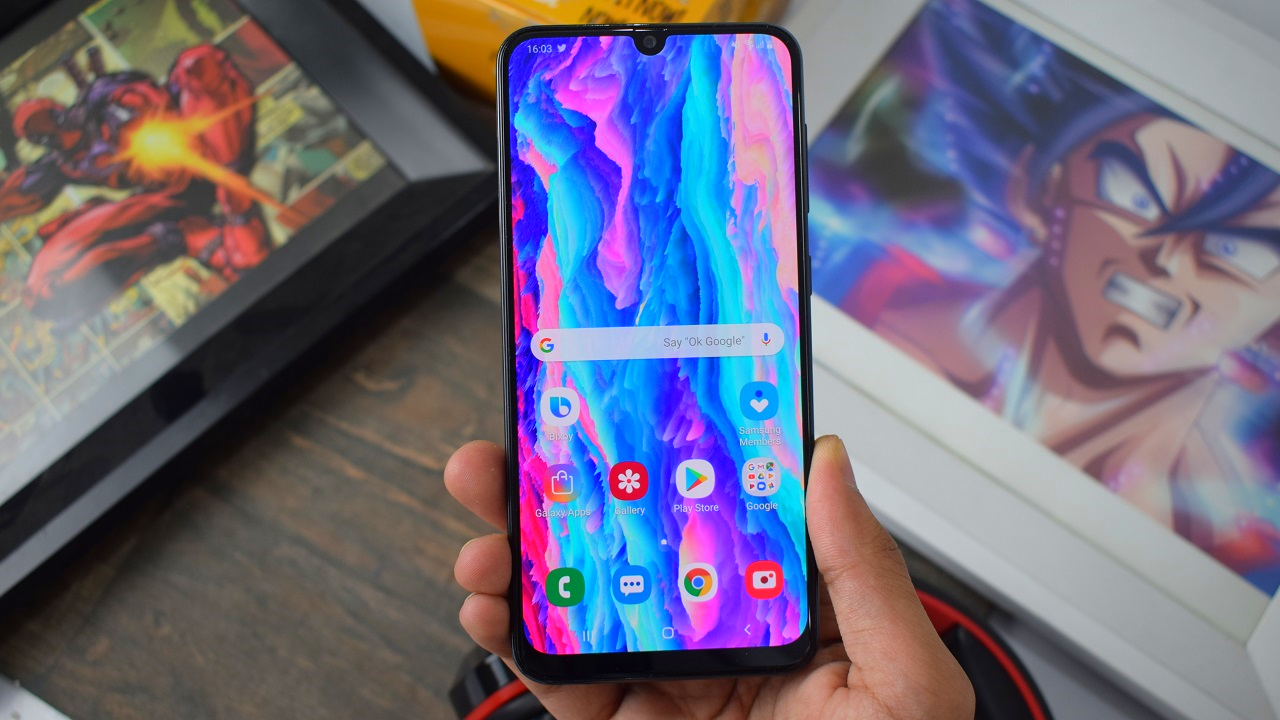
Samsung Galaxy A50 Review - Samsung Nailed It.. But!!!

Samsung new 2019 Galaxy A Smartphones are Official, We got our hands on with the Galaxy A50, and here's the Full Review you must watch before even thinking to buy one..


Coding Careers You Can Do Remotely

Having the technical ability to write code is one of the most desired skills in today’s job market. The amount of jobs in this sector has increased yearly, so learning to write code can be a great career for people fresh out of school as well as those looking to change careers. It is also a popular career for people who prefer to work remotely.

There is a misconception that learning how to code is difficult. However, it actually isn’t as tough as people think, especially for problem solvers who enjoy finding the solution to difficult puzzles. One of the most popular methods of learning this skill is to attend a coding bootcamp of which there are numerous ones to choose from. The following are some of the careers in coding to consider that will enable you to work remotely.

1. Web Developer

A web developer is a one size fits all description for anyone who writes code as their primary job. Writing code is generally what developers, and that is what powers every website found on the internet. A web developer typically works with a website designer to turn their envisioned design into a functioning website.

Developers usually spend their days writing code in JavaScript, Ruby, Python, PHP and many other languages to build a website. When searching for a web development job, companies will state the specific coding language you should be knowledgeable about. With careers in this field averaging around $65k a year, it is a good option for people with general knowledge of coding.

2. Frontend Developer

A frontend developer is responsible for writing the code for the part of a website that users see. CSS, HTML and at times JavaScript are used to shape the functions and appearance of a website. The majority of what you see on a website, also known as the presentation layer, is written by front end developers. These can include animated icons, buttons and the basic text in blog posts.

However, some plugins that enable these things to work may be developed by someone else. Front end developers work with back end engineers to create apps and websites that are user-friendly and work as in ways that are intuitive for users. People in this career can make upwards of the high five figures in salary, meaning this is a very in-demand job.

3. Backend Engineers

Backend engineers or developers are responsible for the server side of coding that enables a website to work. They integrate code written by front end developers with the backend code, which is where data like user accounts, content, or anything kept in databases is stored for access.

They mostly work with databases, APIs and languages like Python, PHP, and Ruby. However, they are also familiar with the frontend codes like JavaScript, CSS, and HTML. This allows them to ensure both types of code work together.

4. App Developer

An app developer is someone who builds applications for websites and mobile devices. The specific languages and skills they need depend on the platform the app is meant for like Windows, Android or iOS.

Basically, a website designer designs a prototype and user interface. The app developer makes this website function on mobile and tablet devices. Developers who work on the most popular apps can earn well into the mid-six figures, which makes this among the most popular careers for coders.

With the tech industry booming, it makes sense to pursue a career in coding. The careers can be quite lucrative, and they cater toward people who prefer to work remotely. This is why writing code is a job skill so in demand and should continue to be as long as technology keeps improving.

3 Upcoming Technologies for Mobile Phones

One of the most frustrating qualities of modern technology is the way that it is continually changing, usually faster than most consumers are able to keep up with. 

It’s true what they say about when you purchase a new computer the technology will have already become outdated before its warranty has expired. And it makes little difference if the technology is for mobile phones, computers or audio/video equipment – they all rapidly become outdated as soon as you bring your purchase home.

Recently bought a new phone? This news might just hit you the hardest. 2019 is shaping up to be the beginning of a wave of technological advances for mobile phones. The following are some of the new technologies that will debut this year and in the near future.

Foldable Touchscreens

The idea of a foldable touchscreen for mobile devices has been floating around for several years now and finally there will be a couple of products integrating this technology on the market this year. Yup, Huawei and Samsung are both bringing mobile phones with a folding touchscreen to the market in 2019.

Both phones will have the ability to fold to where they are the size of a typical cell phone as well as being able to be unfolded so that the screen is the size of smaller tablets. Of course, the prices for these devices are expensive, so if you buy, you’ll probably want to protect them with something close to bubble wrap. Since that isn’t feasible the next best thing is to make sure you have the strongest case available for these new folding touchscreen phones.

Mobile Augmented Technology

Most cell phones act as all-in-one devices that can handle all your communication and entertainment needs. With more intelligent devices like iPhones and Samsung Galaxy on the market, cell companies have had to create new ways for a device to perform to keep consumers interested. Mobile augmented technology is one of the new technologies mobile phones will be able to perform soon.

This technology mixes accelerometers, GPS and the internet to superimpose digitally stored information on the real world. To visualize this, a good example would be when you travel to a new city. You can conceivably point your phone at a building and be able to quickly pull up the history of a building’s construction or information about any of the businesses housed in it, and so forth. All the required technology for this is already available in many mobile devices, so it is only a matter of time before this feature will be perfected and come pre-installed in new phones.

5G

Next to the folding phone, the most anticipated new technology is probably 5G mobile communications. This tech will be getting a formal kickoff at CES 2019, but the momentum will keep building throughout the year as different carriers switch to it and more advanced cell phone towers get erected.

In the three years since Verizon said it would start field-testing 5G, the concept has caused some of the most buzz in the history of technology. The main benefits for switching to 5G is that consumers will be able to use multiple devices with differing connection speeds simultaneously, have access to much more bandwidth and devices using 5G will have faster response speeds. (Basically – faster and better internet access.)

The Future of Tech

Technology lovers have a lot of new things to look forward to in 2019 and the near future. With devices equipped with an enlarged folding touchscreen, 5G communications and mobile augmented tech, the way people use mobile devices is set to change immensely. Not only will it increase interest in technology as a whole, but these advances could very well change our entire lifestyles. That is exciting indeed.

This Wallpaper Application is all you need for your Samsung Galaxy S10 | S10 Plus

Samsung Galaxy S10 and Galaxy S10 Plus comes with Camera Inside the Screen which Samsung calls Infinity-O | Infinity-OO. These phones looks amazing with such futuristic design.

Just after the launch of Samsung Galaxy S10 and S10 Plus, Reddit users broke the Internet with some amazing Wallpapers specially made for these Infinity-O phones. Now, Droidates just came-up with an amazing one time application for your Galaxy S10 and S10 Plus, which is going to provide you all the best Wallpapers from Different Different sources.

Download - Galaxy S10 Wallpapers


Samsung Galaxy A50 and Galaxy A30 Goes Official

Samsung has Officially announced the brand new 2019 Galaxy A50 and Galaxy A30 with Infinity U Display for the Global markets.

Samsung hasn't said anything about the availability and pricing. Here are the Specifications for the Galaxy A30 and A50.
Galaxy A50


Galaxy A30


Redmi Note 7 Review - The Perfect.. Redmi?!!

Xiaomi is all set to announce the Global variant of the Redmi Note 7 which is indeed going to be same as the Chinese variant but with Different Colors and with Global OS.

We got our hands on with the Redmi Note 7, and here's the Full Review you must watch before even thinking to buy one..

Moto Z3 Android 9.0 Pie Update is on Its Way with 5G support through 5G moto mod

Motorola is planning to release the latest Android 9.0 Pie update to its Moto Z3 Smartphone. Android 9.0 Pie update Release Notes for the Moto Z3 is now live.

With Android 9.0 Pie, you'll get new Recents, Rotation suggestion, Adaptive Battery and Adaptive Brightness, Smart replies, App actions, Text selection, Redesigned Quick Setting tiles and Notification Panel, Redesigned Volume Options, Brand new Settings, Privacy, Digital Wellbeings (Dashboard) and Winddown Mode.

Motorola has also added the January 1, 2019 Security Patches along with 5G Support via their 5G Moto Mod.

That said, we'll update the article as soon as we get more information regarding the rollout of Android Pie for the Moto Z3. Stay tuned to our Facebook, Twitter, and Telegram to get the first News.

Moto Z3 Android 9.0 Pie Release Notes -

INTRODUCTION

Motorola is excited to announce a new software update for moto z3. This update brings important improvements to your phone.

ENHANCEMENTS
  • Android security: Includes the updates of Android security patches through January 1, 2019
  • Support 5G through 5G moto mod
  • Android™ 9.0 Pie

Usability

Adaptive battery:
 go longer with a single charge. It prioritises battery power on the apps
you use the most and applies restrictions on the ones you use the least. Battery saver can now be activated from 70% or below.

Adaptive brightness: fewer manual adjustments to perform better. Machine learning takes
notes of your habits and automatically adjusts to your activities.

Quick settings improvements: no shortcuts anymore (toggles are no longer expandable,
but press and hold a toggle goes to the setting detail). The icons have been redesigned with a rounded concept and circular background.

Rotation key: Android Pie presents a temporary rotation even with the auto-rotate disabled. A rotation button is displayed whenever it detects that your phone has changed
orientation.

Dual SIM settings: by pressing the SIM Card toggle in the Quick settings, a full screen
activity is shown to select preferred SIM and manage data usage.

Redesigned Settings app: colourful icons for each selection with a circular background. It also warns if the phone is muted or in Do not disturb mode. Order, name and placement of the settings options have not changed.

Better screenshots: another handy Android 9.0 feature is the addition of the virtual screenshot button/shortcut to the power menu (the old power and volume down method (still works). You can also edit your screenshots immediately after taking them and a delete option is also available.

Improved audio controls: the volume slider is now vertical and close to the volume buttons. Users can switch between ring, mute and vibrate-only mode. Plus, media controls are now the default volume adjusted, and Do not disturb cannot be turned on/off via the volume keys anymore. Bluetooth device volumes are also accessed whenever connected. As usual, 'Volume Up + Power' changes the ring mode to vibrate.

Zoom in text: 
you can finally manage the annoying mistakes of selecting incorrect text. Now, when you press and hold a phrase or text, it will automatically magnify at the pointer.It also helps you read small text and select words precisely.

New and updated emoji: 157 new emojis, as well as a gender-neutral concept.

Settings icon while on PIP mode:
 tapping the new settings icon brings you to the app's PiP settings, where you can enable or disable the feature. 

Other UI changes: time is now on the left side and the search bar is now rounded. There is a new task manager/recents list that now shows a horizontal list instead of a vertical one and includes the split screen capabilities by pressing the app icon above the thumbnail. Dragging the split screen border will select the app you want in full screen

Notifications

Notification UI changes:
 notifications now have rounded corners. It also supports inline images/stickers and distinguishes single/group conversations.

Dismissing notifications: Android Pie will now suggest a couple of actions to you for the type of notifications you usually dismiss. It will offer to turn off frequently dismissed notifications by asking you if you would like to stop seeing these notifications or keep showing them.

Notification bar: maximum of 4 visible notifications in the status bar before the list is truncated with a dot to indicate more unseen icons.

Manage notifications: a shortcut at the bottom of the cards in the notification shade that allows you to see a user-facing list of recent notification activity. If it's something annoying, you can flip the toggle right there to disable unwanted notifications in the future.

Performance

Performance improvements:
 applications will launch faster and use less memory, gaining performance and efficiency improvements.

Power efficiency: refinements to Doze, App Standby and Background Limits to improve battery life.

Background App privacy: the system restricts access to the phone's microphone, camera and other sensors (other than GPS). A persistent notification is shown if an app needs access while in the background.

Bluetooth enhancements: simultaneous connection of up to 5 Bluetooth audio devices. However, there is no option for simultaneous playback: users need to choose the device to be used. Android 9.0 also remembers the last volume level for paired devices.

Wi-Fi optimisation: Wi-Fi hotspot goes OFF in case of no connection. It disables automatically, preventing others nearby from connecting to your network. Stability improvements: includes changes that fix bugs and improve the stability of your phone.

Stability improvements: includes changes that fix bugs and improve the stability of your phone

Security

Security enhancements: 
an alert tone will be heard when a call is being recorded to all parties. The pattern unlock also hides the swipe trail, instead of simply leaving the trail visible until the phone has fully unlocked. Better for security.

Data encryption: Android Pie will now perform client-side data encryption and/or decryption on the user's phone: authentication is required (password, PIN, pattern), plus Google backs up all information to the cloud and hacker attacks become much more difficult.

DNS over TLS support: it creates a secure connection to the DNS server before DNS queries and responses happen. For example, someone monitoring the connection will have a harder time seeing what you're doing. HTTPs by default: all applications built for Android Pie onwards will send and receive data via HTTPS by default, ensuring your data is better protected as you communicate with the app's servers, especially public Wi-Fi. You can use SpeedCheck for testing our your Internet Speed on the Moto Z3.

HTTPs by default: all applications built for Android Pie onwards will send and receive data via HTTPS by default, ensuring your data is better protected as you communicate with the app's servers, especially public Wi-Fi.

//Motorola

Asus Zenfone Max Pro M1 gets January 2019 Security Patches

The Asus Zenfone Max Pro M1 is now getting the latest Android security patch, bug fixes, and improvements.

If you own a Asus Zenfone Max Pro M1 you should have received the over-the-air update notification for January 1, 2019 Android security update. New software update for the Max Pro M1 brings along Bug fixes and Stability improvements. It has FOTA version - OPM1.WW_Phone-15.2016.1901.339-20190108.

Note that the Asus Zenfone Max Pro M1 still runs Android 8.1 Oreo. Asus has already announced that the Max Pro M1 will be getting Android 9.0 Pie.

If you haven't got the notification of this new software update yet, Just go to Settings - About Phone - Software updates, and It will automatically start downloading the latest update. The update will take around 10-15 minutes to get Installed on your device. Stay tuned to our Facebook, Twitter, and Telegram to get the first News.

This could be our first look at the OnePlus 7

It's 2019 and all brands are gearing up to launch their new Smartphones.

Now according to the latest leak, this could be our very first look at the OnePlus 7 or maybe OnePlus's upcoming 5G Smartphone.

As per design, this new OnePlus device seems to be having a 3D glass panel and no to minimal bezels which points towards it having a slider or bottom camera sensor.


There's no information about the Specifications or Features, but this could feature a Snapdragon 855 Processor, 8GB of RAM and triple rear cameras. Thoughts?

Motorola Moto Z3 Gets December 2018 Security Patch

The Motorola Moto Z3 is now getting the latest Android security patch, bug fixes, and improvements.

If you own a Moto Z3 you should have received the over-the-air update notification for December 1, 2018 Android security update. New software update for the Moto Z3 brings along Bug fixes and Stability improvements.

Note that the Moto Moto Z3 still runs Android 8.1 Oreo. Motorola has already announced that the Moto Z3 will be getting Android 9.0 Pie.

Motorola’s instructions explain that for a successful installation, the battery in your phone should be at least 50% charged and your device should be connected to a Wi-Fi network or LTE.

If you haven't got the notification of this new software update yet, Just go to Settings - About Phone - Software updates, and It will automatically start downloading the latest update. The update will take around 10-15 minutes to get Installed on your device. Stay tuned to our Facebook, Twitter, and Telegram to get the first News.

Image: Henry Gomez

How to Utilize Apps to Boost Your Content Creation

How to Utilize Apps to Boost Your Content Creation
Everyone can start a website or blog these days. Everyone has an opinion, and so many of the users on the Internet are focused on being the center of attention, rather than contributing to any sort of discussion or debate. Businesses find it hard to succeed in this attention market, and if you are a personal blogger, you can all but hope to kiss your dreams goodbye unless you can work tirelessly to create and engage with your own audience.

Being away from your phone when you hope to monetize your website is business suicide. The attention market doesn’t care if you need a day off. Between search engines and social media feeds alike, disappearing and not being consistent with quality production can damage your progress thus far.

Before you stress, however, it is easy to create compelling content on the go. Write up a draft of an article on your commute, edit it at your lunch, and by tomorrow morning you have a great post to send out. To create this content on the go, however, you are going to need to download a few essential apps:

What Apps You Will Need

The apps you will need to plan, draft, and create compelling content on the go include:

1. Education Apps
Education is one aspect of life we should never stop. Not only will it boost our understanding of the world around us, but it also enables you to create informative, engaging content. Luckily, with education apps like the edX online training app, you can take your learning one step further and actually further your web design and marketing skills for free. Available from the experts at edX training app, this innovative app allows you to stream and download online classes, test your knowledge with quizzes and search for any subject. What’s more, it has great reviews, scoring an incredible 4.6 out of 5 on Google’s Play Store.

2. A Note-Taking App

If you do not like the note-taking app that comes with your phone, then you have plenty of third-party apps to choose from. Try out a few and stick with the one with the easiest interface. If it has a cloud-backup system that allows you to access your notes between your phone and computer, then even better.

3. A Blogging App

If your website is hosted on WordPress, you can quickly draft posts through the WordPress app. You will probably want to review it on a computer beforehand, but for drafts it is ideal.

4. Social Media Apps

Social media apps for the top platforms like Facebook, Instagram, Twitter, and Pinterest are needed for marketing and PR. With Facebook, however, try downloading their Facebook Pages app for more control.

There are so many ways you can create a successful blog and make a profit off of it, but you need to be dedicated. Don’t let your misconceptions about your dream cloud your judgment. You need to know what to expect before you go in. Managing a successful site takes a lot of work, and you need to be able to succeed in a variety of different roles. So, start learning more on a regular basis, and use the apps outlined here so you can get into the habit of creating great content regularly.

Galaxy S10 Lite Leaks Online

Samsung is all set to announce the NEXT Galaxy S Smartphones early 2019. The company plans to launch 3 Galaxy S10 phones namely Samsung Galaxy S10, S10 Plus, and S10 Lite.

Samsung Galaxy S10 Lite is going to be a cheaper variant of the Galaxy S10/ S10 Plus with low end Specifications and Design Changes.

Ice universe just posted a Case render of the upcoming Galaxy S10 Lite showcasing the Side Fingerprint sensor, and Dual Rear Cameras. It is rumored to feature Flat Screen with a Display hole for Front facing Camera.


Moto X4 Android 9.0 Pie Update is on Its Way

Motorola is planning to release the latest Android 9.0 Pie update to its Moto X4 Smartphones. Android 9.0 Pie update Release Notes for the Standard Moto X4 and Moto X4 Android One are now live.

With Android 9.0 Pie, you'll get new Recents, Rotation suggestion, Adaptive Battery and Adaptive Brightness, Smart replies, App actions, Text selection, Redesigned Quick Setting tiles and Notification Panel, Redesigned Volume Options, Brand new Settings, Privacy, Digital Wellbeings (Dashboard) and Winddown Mode.

That said, we'll update the article as soon as we get more information regarding the rollout of Android Pie for the Moto X4. Stay tuned to our Facebook, Twitter, and Telegram to get the first News.

Moto X4 Android 9.0 Pie Release Notes -

INTRODUCTION

Motorola is excited to announce a new software update for moto x4. This update brings important improvements to your phone.
For more information on Motorola updates and repairs, visit us at www.motorola.com/mymotox.

NOTE: all information on your phone will be saved. You cannot downgrade to a previous software version after installing this update.

ENHANCEMENTS

Android™ 9.0 Pie improves your mobile experience from the new Intuitive Navigation and Recent App, an improved Do Not Disturb mode and a colourful settings menu, to anticipated longer battery life and revamped split screen. Android Pie also brings a redesigned Quick Settings, simplified volume controls, an easier way to manage notifications and more.

After installing the software update you may notice changes that include*:

Usability

Adaptive battery:
 go longer with a single charge. It prioritises battery power on the apps
you use the most and applies restrictions on the ones you use the least. Battery saver can now be activated from 70% or below.

Adaptive brightness: fewer manual adjustments to perform better. Machine learning takes
notes of your habits and automatically adjusts to your activities.

Quick settings improvements: no shortcuts anymore (toggles are no longer expandable,
but press and hold a toggle goes to the setting detail). The icons have been redesigned with a rounded concept and circular background.

Rotation key: Android Pie presents a temporary rotation even with the auto-rotate disabled. A rotation button is displayed whenever it detects that your phone has changed
orientation.

Dual SIM settings: by pressing the SIM Card toggle in the Quick settings, a full screen
activity is shown to select preferred SIM and manage data usage.

Redesigned Settings app: colourful icons for each selection with a circular background. It also warns if the phone is muted or in Do not disturb mode. Order, name and placement of the settings options have not changed.

Better screenshots: another handy Android 9.0 feature is the addition of the virtual screenshot button/shortcut to the power menu (the old power and volume down method (still works). You can also edit your screenshots immediately after taking them and a delete option is also available.

Improved audio controls: the volume slider is now vertical and close to the volume buttons. Users can switch between ring, mute and vibrate-only mode. Plus, media controls are now the default volume adjusted, and Do not disturb cannot be turned on/off via the volume keys anymore. Bluetooth device volumes are also accessed whenever connected. As usual, 'Volume Up + Power' changes the ring mode to vibrate.

Zoom in text:
you can finally manage the annoying mistakes of selecting incorrect text. Now, when you press and hold a phrase or text, it will automatically magnify at the pointer.It also helps you read small text and select words precisely.

New and updated emoji: 157 new emojis, as well as a gender-neutral concept.

Settings icon while on PIP mode:
tapping the new settings icon brings you to the app's PiP settings, where you can enable or disable the feature. 

Other UI changes: time is now on the left side and the search bar is now rounded. There is a new task manager/recents list that now shows a horizontal list instead of a vertical one and includes the split screen capabilities by pressing the app icon above the thumbnail. Dragging the split screen border will select the app you want in full screen
Notifications

Notification UI changes:
 notifications now have rounded corners. It also supports inline images/stickers and distinguishes single/group conversations.

Dismissing notifications: Android Pie will now suggest a couple of actions to you for the type of notifications you usually dismiss. It will offer to turn off frequently dismissed notifications by asking you if you would like to stop seeing these notifications or keep showing them.

Notification bar: maximum of 4 visible notifications in the status bar before the list is truncated with a dot to indicate more unseen icons.

Manage notifications: a shortcut at the bottom of the cards in the notification shade that allows you to see a user-facing list of recent notification activity. If it's something annoying, you can flip the toggle right there to disable unwanted notifications in the future.

Performance

Performance improvements:
applications will launch faster and use less memory, gaining performance and efficiency improvements.

Power efficiency: refinements to Doze, App Standby and Background Limits to improve battery life.

Background App privacy: the system restricts access to the phone's microphone, camera and other sensors (other than GPS). A persistent notification is shown if an app needs access while in the background.

Bluetooth enhancements: simultaneous connection of up to 5 Bluetooth audio devices. However, there is no option for simultaneous playback: users need to choose the device to be used. Android 9.0 also remembers the last volume level for paired devices.

Wi-Fi optimisation: Wi-Fi hotspot goes OFF in case of no connection. It disables automatically, preventing others nearby from connecting to your network. Stability improvements: includes changes that fix bugs and improve the stability of your phone.

Security

Security enhancements:
an alert tone will be heard when a call is being recorded to all parties. The pattern unlock also hides the swipe trail, instead of simply leaving the trail visible until the phone has fully unlocked. Better for security.

Data encryption: Android Pie will now perform client-side data encryption and/or decryption on the user's phone: authentication is required (password, PIN, pattern), plus Google backs up all information to the cloud and hacker attacks become much more difficult.

DNS over TLS support: it creates a secure connection to the DNS server before DNS queries and responses happen. For example, someone monitoring the connection will have a harder time seeing what you're doing. HTTPs by default: all applications built for Android Pie onwards will send and receive data via HTTPS by default, ensuring your data is better protected as you communicate with the app's servers, especially public Wi-Fi.


4 Programs for Authors That Will Change How You Write

Being an author is difficult. Perfecting the story you want to tell is a process, and mall and tedious things can make it happen slower than you want it to. 

Fortunately, there are programs created specifically for authors. These programs aim to help with the creation and completion of your work. To make your life easier, here’s a list of 4 programs that will help you improve your writing. Consider using a few to become the best author you can be!

1. Scrivener

Scrivener is the current cream of the crop when it comes to programs for authors. You can get this program through a one time purchase of around $45-$50 dollars. It’s like Word, but a souped-up and more author-centric version. Here are just a few things you can do with Scrivener:
  • Compile small docs into one big one easily 
  • Save documents as an ePub or Word doc 
  • Use templates designed for novels, screenplays, comics, scripts, etc. 
  • Crate character and scene sketches 
  • Storyboard your piece 
  • Store research files 
  • Set writing targets 
All these options give you an author’s dream tool belt. If you’re considering purchasing this program but are still on the fence, read a well-informed and thorough Scrivener review to help you decide.

2. Microsoft Word

Microsoft Word is like an old and reliable friend. Word is simple and easy to use, and that means easier writing. You might be a traditionalist or stick with what you know best, and that means using Microsoft Word as your word processing software.

While Word doesn’t have as many author-designed tools as Scrivener, it might be what you have or what you like. Luckily, Word still has plenty of features that are useful to an author.

In Word, you can create chapters and use them to navigate your document. You can also use their free book-writing template. It also has a spell and grammar check tool that you can use as you’re writing. Word might not be the most advanced, but it’s widely available. No matter what, you can always find ways to make Word work towards bettering your writing.

3. Grammarly

With the way education systems vary, not all of us are grammar experts. But, that shouldn’t stop you from being the best writer you can be! 

Grammarly is an app/browser extension you can purchase and download onto multiple platforms, including Microsoft Word and WordPress. If you fit Grammarly into your publishing budget, it’s bound to become one of your most trusted tools.

Grammarly has some amazing features that are bound to help you as an author. It checks your grammar in real time as you write. On top of that, experts have testified that it is incredibly accurate! If you’re a bit insecure about your grammar, or don’t have room in your budget for a line editor, consider Grammarly – it’s free!

4. Freedom

Freedom is a productivity app/extension that is designed to help you get as much writing done as possible. It’s easy to become distracted or disinterested when working, especially considering the popularity of social media. You might open a new tab to do “research” or get “inspiration” and the next thing you know you’ve spent two hours on Twitter.

Freedom was created to make sure that stops happening. Freedom offers multiple options to manage distractions, including a timer for how long you want to work, the ability to block specific websites, apps, and notifications, the option to block distractions on multiple devices, and more! If you struggle with keeping your attention on the piece that you’re writing, check out Freedom for help.

Creating is never easy, and it’s made even more difficult when technology is added in. Story building doesn’t exactly happen on pen and paper anymore. Luckily, using any one of these programs will help you become a better writer. So pick one, and see what you create!

Asus Zenfone 5Z gets Android 9.0 Pie by the end of January 2019

Now that Google has released the next version of Android, Android 9.0 Pie, the wait for the devices to get the update first has already started. Asus today announced that the Zenfone 5Z will be getting Official Android 9.0 Pie by the end of January 2019.

Yes, we're talking about the Flagship Asus Zenfone 5Z which was announced to compete against the OnePlus 6.

Nokia, OnePlus, Xiaomi, Huawei and Motorola are already on their way to push the latest Pie for most of the devices before 2019 and Asus is still working to get the latest OS on their flagship level phone.

Thoughts?


Motorola Moto G5, G5 Plus, and G5s Plus are getting October 2018 Security Patches

Motorola is now rolling out a wave of October 2018 Security Patches onto its 5th Gen Moto G devices. We are now seeing October 2018 Security Patch Software update for the Moto G5, Moto G5 Plus, and the Moto G5s Plus.

If you own any of the above device you should have received the over-the-air update notification for October 1, 2018 Android security update. New software update for these devices brings along Bug fixes and Stability improvements.

Motorola’s instructions explain that for a successful installation, the battery in your phone should be at least 50% charged and your device should be connected to a Wi-Fi network or LTE.

If you haven't got the notification of this new software update yet, Just go to Settings - About Phone - Software updates, and It will automatically start downloading the latest update. The update will take around 10-15 minutes to get Installed on your device.

That said, we'll update the article as soon as we get more information regarding September 2018 update for Moto devices. Kindly let us know if we missed anything! Stay tuned to our Facebook, Twitter, and Telegram to get the first News.

Samsung Galaxy S9, S9 Plus, and Note 9 Gets One UI on November 15

Samsung is planning to start Android 9.0 Pie Beta with One UI for the Samsung Galaxy S9, Galaxy S9 Plus and Galaxy Note 9 starting November 15.

According to the latest information from Samsung Germany chat support, the One UI with Android Pie will be available as early as November 15 in the form of Beta, while the owners living in UK might see the Beta available starting November 20. There's no information about the software being available for South Korea and the US.

Samsung's latest One UI is also coming to the Galaxy S8, S8 Plus and Note 8. Also Samsung is expected to launch new 2019 Smartphones with Pie based One UI only. Stay tuned to our FacebookTwitter, and Telegram to get the first News.

/itHome

Tips for Starting an E-Commerce Store

Very few things are more rewarding than starting your own business and watching it grow. There are many different reasons why people choose to start their own business. However, the main aim for most of them is to be successful enough to have the freedom to work at something they enjoy. One particular area that is currently very popular is to start an e-commerce business. An increasing number of people are choosing to shop online rather than endure the hassle of shopping on the high street. If you’d like to sell something, whether it's smartphones, the latest gadgets or TVs, here are some tips to help you get started. 

What Are Your Going to Sell and How are You Going to Get Your Products?


If you’re an artist, designer, or crafter, these decisions are easy. However, if you’re not that way inclined, you’re going to need a product or products to sell. There are two options if you want to sell products made by other creators or manufacturers. You can choose to have a stock of items or start selling online with the help of something called dropshipping. If you choose the dropshipping route, you don’t have to keep any stock. Instead, you take orders and pass them to the manufacturer, another retailer, or a wholesaler. They then ship the goods directly to the customer.

Once you’ve decided on a product you want to sell you, then have to find a supplier. It’s also a good idea to check out trade group websites. Trade shows are another way of connecting with suppliers.

Getting Your Store Up and Running


You’ll have to devise a name for your store, but once you have decided on a name that represents you and the services you offer, you’ll be able to organize hosting and domain registration for your e-commerce store website. The best name to choose is one that tells people what you’re offering.

The next decision to make is which platform will power your store. There are two choices. Self-hosted means you’re in charge of hosting, implementing, and maintaining your store. If you’re not that aux fait with the technical requirements, it will be best to hire a developer. Hosted is the other option and this is when a hosting e-commerce platform takes care of the hosting and server maintenance for you. This is the option most non-technical people choose because it is far more user-friendly.

Choose a Payment Gateway


Another important decision you’ll have to make is the choice of payment gateway. Your customers are going to need a way they can easily pay for their purchases. A payment gateway is a merchant service that processes payments for online and offline retailers. When making your decision pay attention to fees that might be charged, the payment types accepted, and whether the payment systems can be integrated with your e-commerce platform.

The final consideration is to think about how you’re going to market your business. The best way to do this is to make sure your store shows up on search engine results.

Here's the OnePlus 6T in Thunder Purple


OnePlus just announced the OnePlus 6T with a gorgeous display, in display fingerprint sensor and other flagship level features.

Just after the announcement, the 6T was made available in two color options including Mirror Black, Midnight Black. Now it seems there's still a limited edition OnePlus 6T variant left that OnePlus will be announcing in near future.

Looks Sleek!

Also Watch:


Source: MrGizmo | Ishan


Motorola One Power is now getting September 2018 Security Update

The Motorola One Power is now getting the latest Android security patch, bug fixes, and improvements.

If you own a Motorola One Power you should have received the over-the-air update notification for September 1, 2018 Android security update. New software update for the One Power brings along Bug fixes and Stability improvements.

Note that the One Power still runs Android 8.1 Oreo. Motorola has already announced that the Motorola One Power will be getting Android 9.0 Pie.

Motorola’s instructions explain that for a successful installation, the battery in your phone should be at least 50% charged and your device should be connected to a Wi-Fi network or LTE.

If you haven't got the notification of this new software update yet, Just go to Settings - About Phone - Software updates, and It will automatically start downloading the latest update. The update will take around 10-15 minutes to get Installed on your device. Stay tuned to our FacebookTwitter, and Telegram to get the first News.

Screenshots ( Selva Raj )